> ## Documentation Index
> Fetch the complete documentation index at: https://help.draftable.com/llms.txt
> Use this file to discover all available pages before exploring further.
# Configuring preferences for your organization
> Overview for system administrators centrally configuring Draftable Clean across their organization using Group Policy, registry settings, or Microsoft Intune.
This article is for system administrators who want to centrally configure Draftable Clean settings across their organization.
## Choose your configuration method
For on-premises Active Directory environments. ADMX/ADML templates, admin profile editor, and full policy reference.
For cloud-managed devices. Import ADMX templates or configure registry settings via OMA-URI.
## How Draftable Clean settings work
Draftable Clean stores its configuration in the **Windows Registry**. When the application starts, it reads the current registry settings to determine its behavior — including cleaning profiles, DMS integrations, licensing, privacy preferences, and more.
Administrators can manage these settings using any tool that writes to the registry, including Group Policy, Microsoft Intune, registry scripts, or other endpoint management tools.
## Priority of settings
Unless otherwise noted, the order of precedence from highest to lowest priority is:
1. **User Policy** (set in User Configuration via Group Policy or Intune administrative templates)
2. **Computer Policy** (set in Computer Configuration via Group Policy or Intune administrative templates)
3. **User Setting** (set by the user through the application UI, or by manually editing the registry)
If no policy setting exists, the user's own setting is used.
## v26.6.0 administrator updates (June 2026)
Draftable Clean **v26.6.0** introduces several enterprise controls for administrators:
* **Enforce must-clean metadata types across all profiles** — require specific metadata types to always be removed, regardless of which cleaning profile is active
* **Outlook add-in lockdown** — lock the default profile, send-protection behaviours, and related add-in defaults so users cannot override organisation standards
* **Individual add-in policy fields** — Outlook add-in settings are exposed as separate Group Policy / Intune administrative template fields, replacing the previous single combined JSON value
* **Updated ADMX templates** — **DomainRules** and **AddInSettings** policies are surfaced explicitly
* **MSI prerequisite change** — the machine-wide MSI no longer requires .NET 10 Desktop Runtime as a separate prerequisite check
Organizations that scripted the previous single JSON blob for add-in settings must migrate to the new individual fields. See [Configuring preferences with Group Policy](/hc/en-us/Draftable-Clean-articles/Configuring-preferences-with-Group-Policy-Draftable-Clean) for migration details, or [Configuring preferences with Microsoft Intune](/hc/en-us/Draftable-Clean-articles/Configuring-preferences-with-Microsoft-Intune-Draftable-Clean) if you deploy via Intune.
See the [v26.6.0 release notes](/hc/en-us/Draftable-Clean-articles/Release-logs-and-notes/Release-Notes-Draftable-Clean-June-2026-v26-6-0) for the full release summary.
## User-facing settings
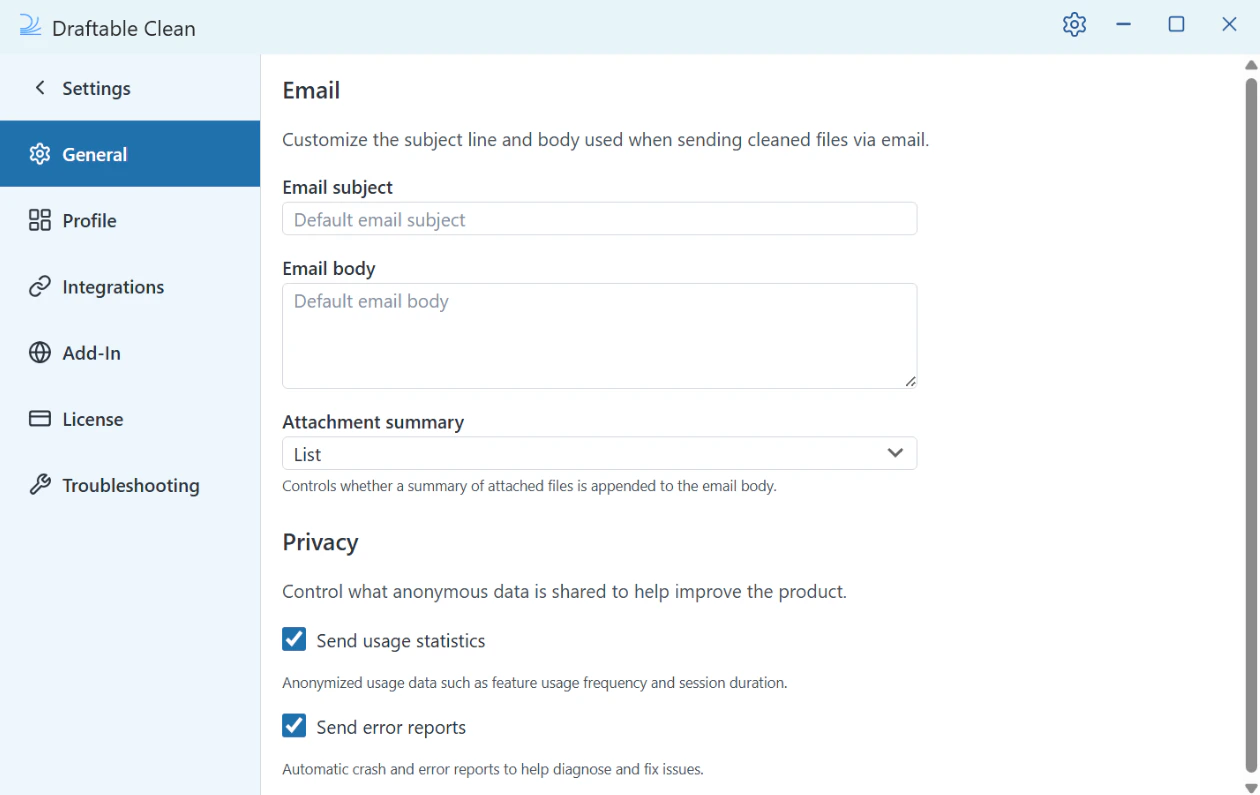
In addition to administrator-managed settings, individual users can configure Draftable Clean through the **Settings** panel (gear icon, top-right corner):
| Section | What can be configured |
| ------------------- | --------------------------------------------------------------------------------------------------------------------------------------------------------------------------------------------------------------------------------------------- |
| **General** | Email subject/body templates, attachment summary format (desktop Email button), privacy (usage statistics, error reports) |
| **Profile** | Create, delete, rename cleaning profiles and set defaults. Built-in profiles and administrator-configured profiles cannot be edited by users. See [Metadata cleaning profiles](/hc/en-us/Draftable-Clean-articles/Metadata-Cleaning-Profiles) |
| **Integrations** | iManage (enable, Server URL, auto-connect), NetDocuments (auto-detected via ndOffice) |
| **Add-In** | Outlook add-in: profile selection, domain rules, send protection, attachment summary format |
| **License** | License status, edition, and expiry date |
| **Troubleshooting** | Email logs, export error logs, open log folder. See [Diagnostic logs and support](/hc/en-us/Draftable-Clean-articles/Troubleshooting-Diagnostic-Logs-and-Support) |
 ### Add-In settings
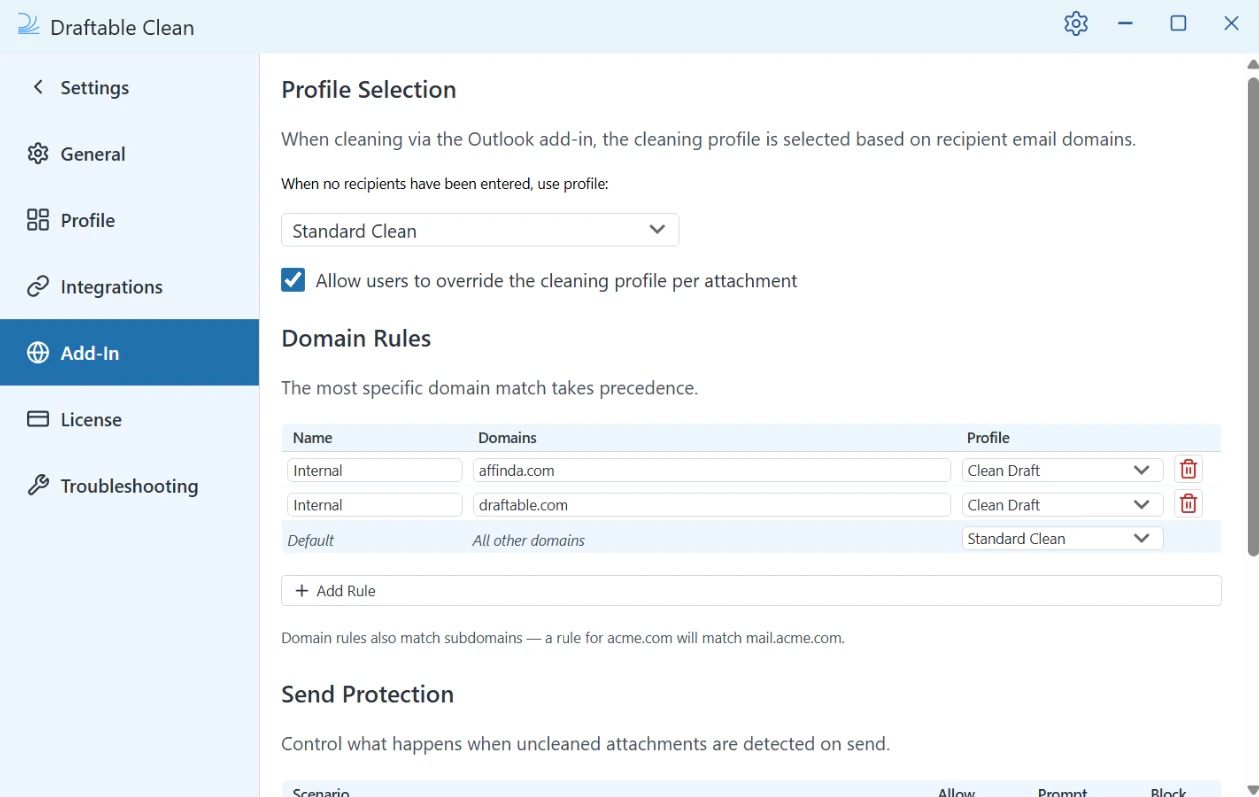
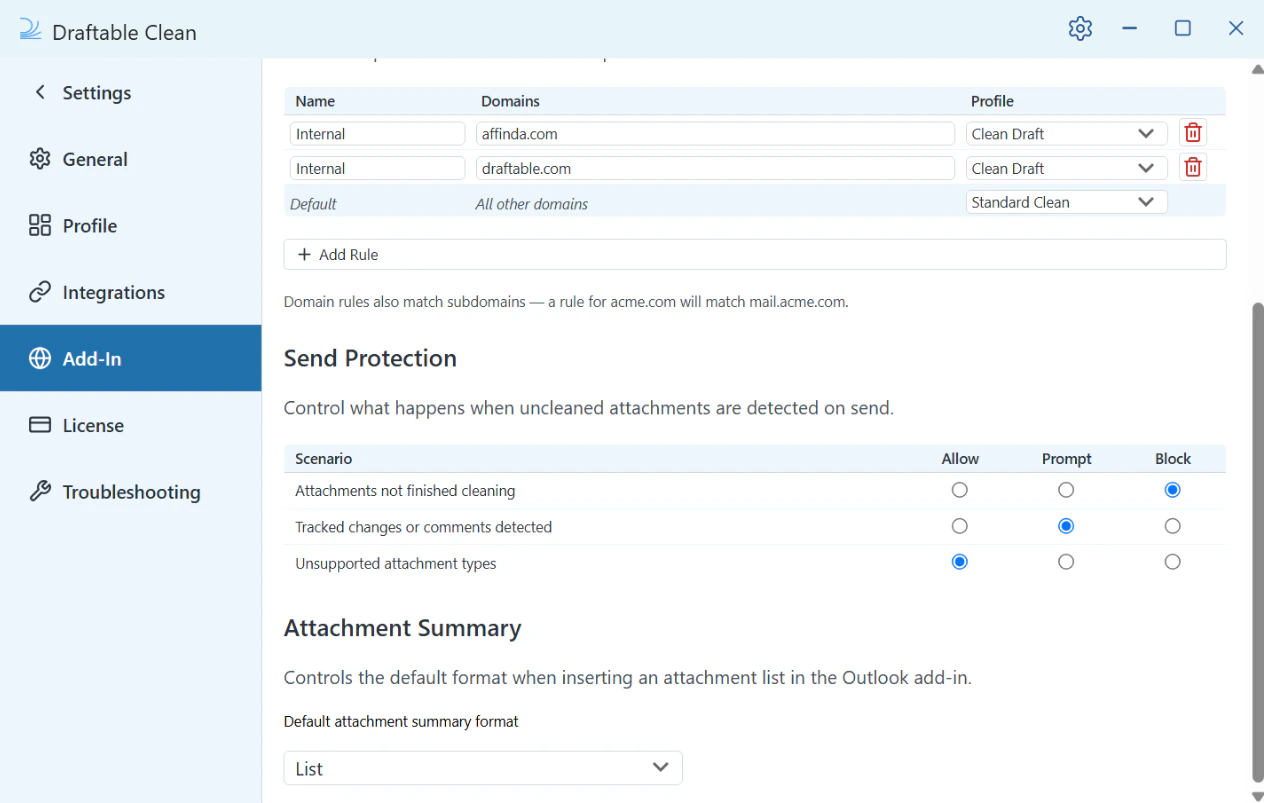
The **Add-In** section controls how the Draftable Clean Outlook add-in behaves:
* **Profile Selection** — The cleaning profile is selected based on recipient email domains. The default profile when no recipients are entered is **Standard Clean**. An option to **allow users to override the cleaning profile per attachment** can also be enabled.
* **Domain Rules** — Maps recipient domains to cleaning profiles. For example, an "Internal" rule for `yourfirm.com` uses **Clean Draft**, while "Default" (all other domains) uses **Standard Clean**. Rules also match subdomains — a rule for `acme.com` will match `mail.acme.com`. The most specific domain match takes precedence.
* **Send Protection** — Controls what happens when issues are detected on send. "Attachments not finished cleaning" defaults to **Block**; "Tracked changes or comments detected" defaults to **Prompt**; "Unsupported attachment types" defaults to **Allow**. Each scenario can be set to Allow, Prompt, or Block.
* **Attachment Summary** — Controls the default format when inserting an attachment list. Default: **List**.
### Add-In settings
The **Add-In** section controls how the Draftable Clean Outlook add-in behaves:
* **Profile Selection** — The cleaning profile is selected based on recipient email domains. The default profile when no recipients are entered is **Standard Clean**. An option to **allow users to override the cleaning profile per attachment** can also be enabled.
* **Domain Rules** — Maps recipient domains to cleaning profiles. For example, an "Internal" rule for `yourfirm.com` uses **Clean Draft**, while "Default" (all other domains) uses **Standard Clean**. Rules also match subdomains — a rule for `acme.com` will match `mail.acme.com`. The most specific domain match takes precedence.
* **Send Protection** — Controls what happens when issues are detected on send. "Attachments not finished cleaning" defaults to **Block**; "Tracked changes or comments detected" defaults to **Prompt**; "Unsupported attachment types" defaults to **Allow**. Each scenario can be set to Allow, Prompt, or Block.
* **Attachment Summary** — Controls the default format when inserting an attachment list. Default: **List**.
 Where a Group Policy or Intune-managed setting exists, it takes priority over the user's own setting.
## Need help?
If you need assistance configuring Draftable Clean across your organization, contact the Draftable team at [support@draftable.com](mailto:support@draftable.com).
Where a Group Policy or Intune-managed setting exists, it takes priority over the user's own setting.
## Need help?
If you need assistance configuring Draftable Clean across your organization, contact the Draftable team at [support@draftable.com](mailto:support@draftable.com).