> ## Documentation Index
> Fetch the complete documentation index at: https://help.draftable.com/llms.txt
> Use this file to discover all available pages before exploring further.
# Release notes: Draftable Legal v2.10.0 - v2.10.7
> We are excited to share our latest updates to Draftable Legal.
Throughout August and early September, our priorities have been to:
* [**Improve iManage workflows**](#improved-imanage-workflows) to enhance ease of use
* Add a [**comparison progress bar**](#comparison-progress-bar) to improve user experience
* Add **[compare and generate Powerpoint files](#compare-and-generate-powerpoint-files)** to our core comparison functionality
* **[Resolve software environmental issues](#strengthened-reliability)** to strengthen product reliability
* Provide **[new troubleshooting capabilities](#better-debugging-tools-to-speed-up-issue-resolution)** to improve deployment and issue support
* **[Update our color theme & license name](#a-new-blue-theme-to-align-ui-with-industry-norms)** to align UI with industry conventions
You can read more about these features in the following sections.
***But first, a note from our product team***
Our product improvements are the direct result of insights from our customers. We are extremely grateful for the excellent feedback we received which allowed this 2.10 release to be possible.
If you have feature ideas or product performance feedback, we would love to hear from you. Please share any suggestions with us by contacting [support@draftable.com](mailto:upport@draftable.com)
## Improved iManage workflows
We are committed to ensuring our customers can use Draftable Legal wherever they need it. Thanks to excellent feedback from our customers we have been able to make several improvements to the iManage integration workflow available for Draftable Legal.
### Launch from iManage now available
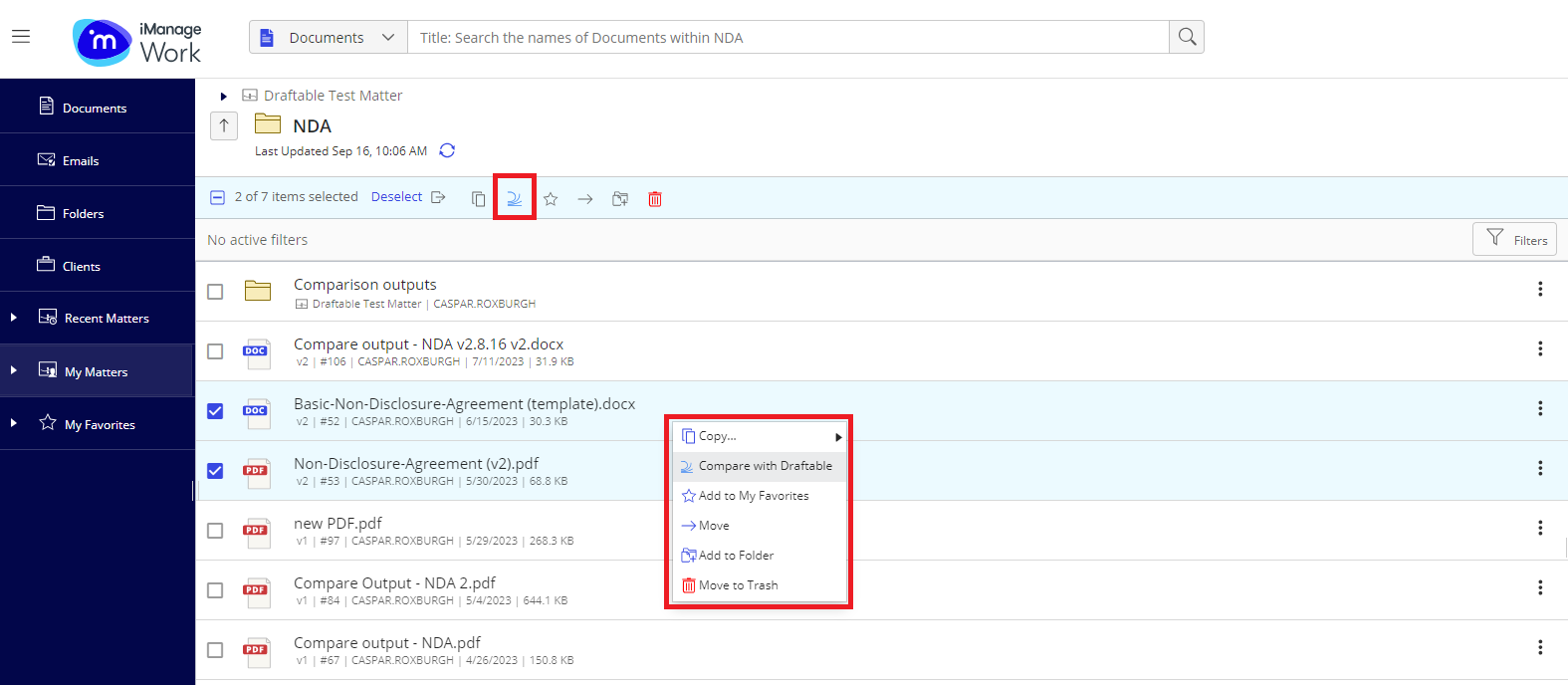
One of the most requested features we've had has been the ability for users to launch their comparisons from within iManage. We are pleased to share this feature is now available in both iManage Cloud and on-premise. There are two ways users can load files into Draftable. The first is by selecting the files and using the 'compare with Draftable' option (via the icon in their menu above the files). The second option allows user to select 'compare with Draftable' via right click. This feature works for selecting files and versions. Note: users will not be able to see 'Compare with Draftable' option if selecting three or more files.
Customers will need to have their administrators set up the 'Compare with Draftable' in their iManage environment before it is available to use. **[Our team has prepared an administrator guide on setting up the 'launch from iManage' feature](/hc/en-us/articles/22860371094681-Configuring-iManage-to-be-able-to-launch-comparisons-directly-from-within-iManage), [which can be found here](/hc/en-us/articles/22860371094681-Configuring-iManage-to-be-able-to-launch-comparisons-directly-from-within-iManage).**
 ### File types and names correctly defaulting when saving to iManage
Also included in the 2.10 releases were two smaller improvements to the 'save to iManage' workflow.
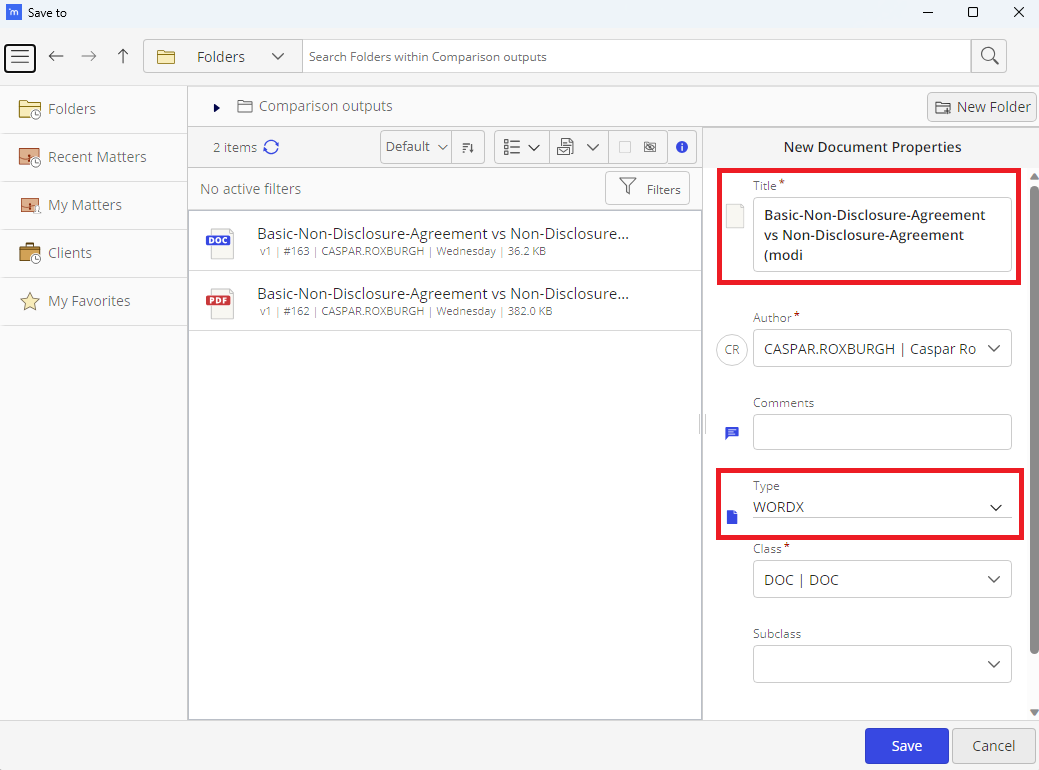
Users will now have their **comparison outputs 'file name' (e.g. and 'file type' (e.g. DOC, PDF) pre-filled by default when saving to iManage**. This removes two previously required steps from the save to iManage workflow to save users time and effort.
### File types and names correctly defaulting when saving to iManage
Also included in the 2.10 releases were two smaller improvements to the 'save to iManage' workflow.
Users will now have their **comparison outputs 'file name' (e.g. and 'file type' (e.g. DOC, PDF) pre-filled by default when saving to iManage**. This removes two previously required steps from the save to iManage workflow to save users time and effort.
 ## Comparison progress bar
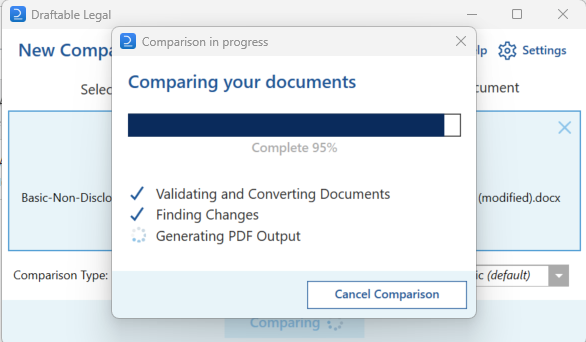
We have heard from users that they would like to see the progress of comparisons in addition to the steps being completed (which were added in v2.9). In response, our algorithm team have developed a progress bar that links to actual steps in the compare. This provides for a much better experience while waiting for comparisons to complete.
## Comparison progress bar
We have heard from users that they would like to see the progress of comparisons in addition to the steps being completed (which were added in v2.9). In response, our algorithm team have developed a progress bar that links to actual steps in the compare. This provides for a much better experience while waiting for comparisons to complete.
 In future, we plan to further enhance the waiting-for comparison experience by:
* Providing users with estimates of the time the comparison will take to complete.
* Notifying users when a comparison is finished.
The objective of this will be to allow users to continue working on other items while waiting for longer comparisons to complete.
## Compare and generate PowerPoint files
Draftable Legal now offers users the ability to run comparisons of PowerPoint files as 'Redline tracked changes (.pptx)'. This new comparison functionality, available from v2.10.8 onwards allows users to generate an output in MS PowerPoint with changes shown using the interactive review functionality provided by PowerPoint.
### Running a PowerPoint compare with Draftable
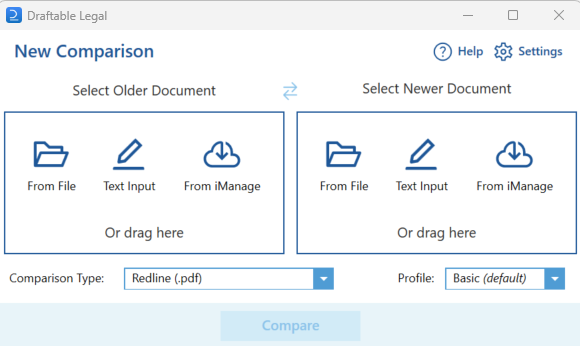
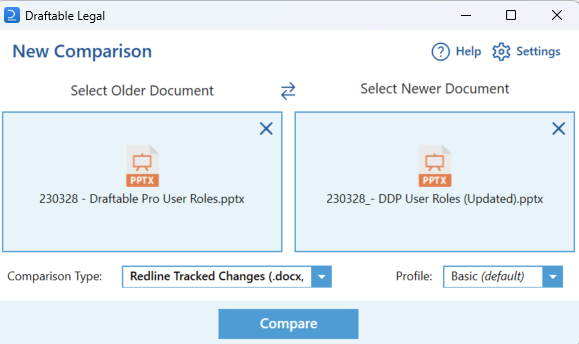
Running a PowerPoint comparison in Draftable is easy. Just load the ppt or pptx files into the New Comparison window and select the 'Redline Tracked Changes (.docx, .pptx)' comparison type from the drop-down menu.
In future, we plan to further enhance the waiting-for comparison experience by:
* Providing users with estimates of the time the comparison will take to complete.
* Notifying users when a comparison is finished.
The objective of this will be to allow users to continue working on other items while waiting for longer comparisons to complete.
## Compare and generate PowerPoint files
Draftable Legal now offers users the ability to run comparisons of PowerPoint files as 'Redline tracked changes (.pptx)'. This new comparison functionality, available from v2.10.8 onwards allows users to generate an output in MS PowerPoint with changes shown using the interactive review functionality provided by PowerPoint.
### Running a PowerPoint compare with Draftable
Running a PowerPoint comparison in Draftable is easy. Just load the ppt or pptx files into the New Comparison window and select the 'Redline Tracked Changes (.docx, .pptx)' comparison type from the drop-down menu.
 ### Reviewing and continuing work in PowerPoint
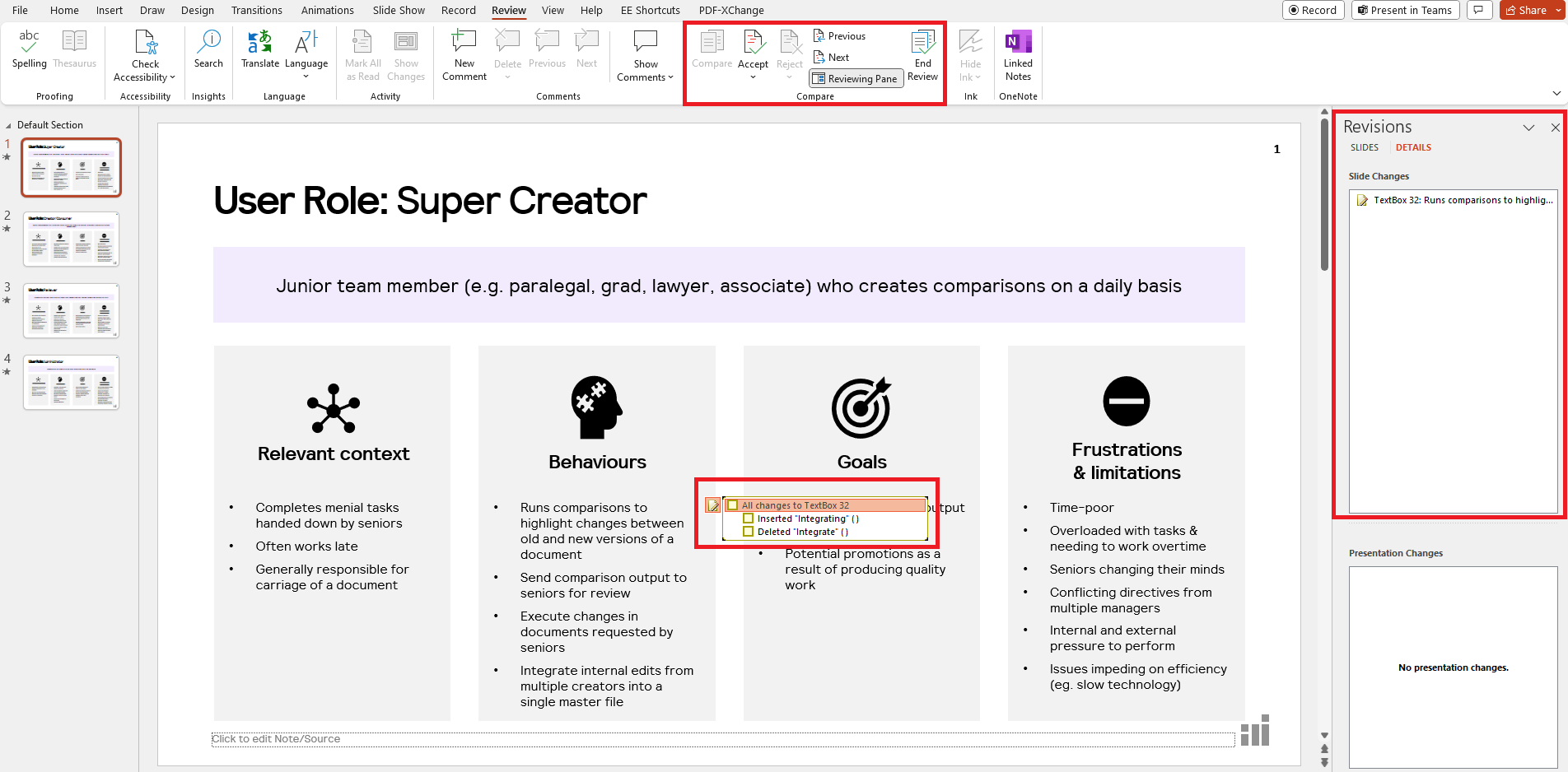
After running the comparison, the new 'Redline Tracked Changes (..pptx)' comparison type from Draftable opens directly to PowerPoint. Once open, users can navigate changes using the review pane on the right hand side of their PowerPoint or by using the 'next' and 'previous' change options in the PowerPoint Ribbon menu. Changes can be accepted or rejected as with MS Word outputs.
### Reviewing and continuing work in PowerPoint
After running the comparison, the new 'Redline Tracked Changes (..pptx)' comparison type from Draftable opens directly to PowerPoint. Once open, users can navigate changes using the review pane on the right hand side of their PowerPoint or by using the 'next' and 'previous' change options in the PowerPoint Ribbon menu. Changes can be accepted or rejected as with MS Word outputs.
 ## Strengthened reliability
As an enterprise desktop product, Draftable must interact with a variety of third-party software. These include Windows, Word, File Explorer, Outlook, Adobe and a long tail of other less common software products that interact with documents on user's machines. Thanks to the great feedback from customers, we have been able to identify and resolve a range of customer-specific (i.e. environmental) issues associated with software settings and permissions. With these resolved, customers can be confident that Draftable will operate as expected in their environment, including with their unique Word templates and IT security settings.
Specific fixes included in the 2.10 releases were:
* Fixes for Comparison Progress window not including OCR step when comparison started really fast after dropping files
* Office integration cleanups and fixes by moving all P/Invoke code into NativeMethods class for Office
* Ensure the built-in Word PDF text converter is Kofax compatible
* Bugfix for issue selecting "Changed pages output" when exporting to email (was failing when document was not ready)
* Bugfix for side-by-side comparison error
* Bugfix for disabling the PDF warning in Office in some scenarios
### Better debugging tools to speed up issue resolution
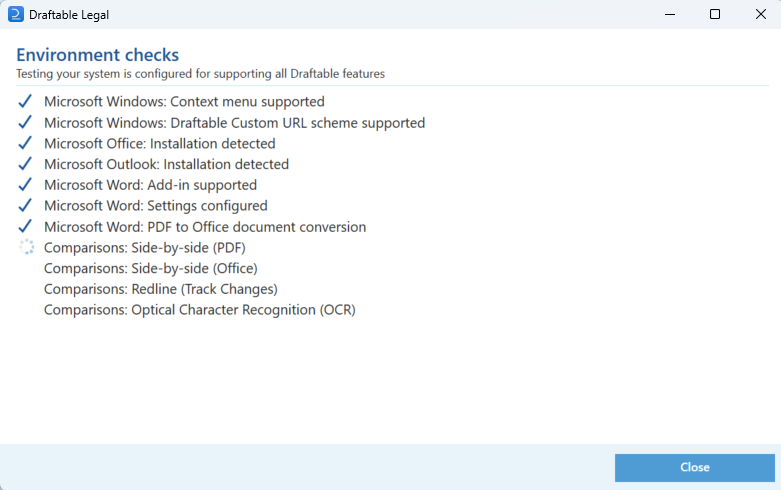
Throughout the process of addressing these issues, we have also significantly improved our system verification (to identify bugs before customers need to run their comparisons). You can [**read more about this System Verification tool here**](/hc/en-us/articles/22088193885721-Performing-system-verification-in-Draftable-Legal). We have also improved our error logs to include more system information, meaning environmental issues are able to be resolved faster.
## Strengthened reliability
As an enterprise desktop product, Draftable must interact with a variety of third-party software. These include Windows, Word, File Explorer, Outlook, Adobe and a long tail of other less common software products that interact with documents on user's machines. Thanks to the great feedback from customers, we have been able to identify and resolve a range of customer-specific (i.e. environmental) issues associated with software settings and permissions. With these resolved, customers can be confident that Draftable will operate as expected in their environment, including with their unique Word templates and IT security settings.
Specific fixes included in the 2.10 releases were:
* Fixes for Comparison Progress window not including OCR step when comparison started really fast after dropping files
* Office integration cleanups and fixes by moving all P/Invoke code into NativeMethods class for Office
* Ensure the built-in Word PDF text converter is Kofax compatible
* Bugfix for issue selecting "Changed pages output" when exporting to email (was failing when document was not ready)
* Bugfix for side-by-side comparison error
* Bugfix for disabling the PDF warning in Office in some scenarios
### Better debugging tools to speed up issue resolution
Throughout the process of addressing these issues, we have also significantly improved our system verification (to identify bugs before customers need to run their comparisons). You can [**read more about this System Verification tool here**](/hc/en-us/articles/22088193885721-Performing-system-verification-in-Draftable-Legal). We have also improved our error logs to include more system information, meaning environmental issues are able to be resolved faster.
 Thanks to these efforts, our team is no longer seeing many environmental issues reported by customers. However, we remain committed to providing an exceptionally reliable product. If you encounter any issues with Draftable, please contact [support@draftable.com](mailto:support@draftable.com)
## A new blue theme to align UI with industry norms
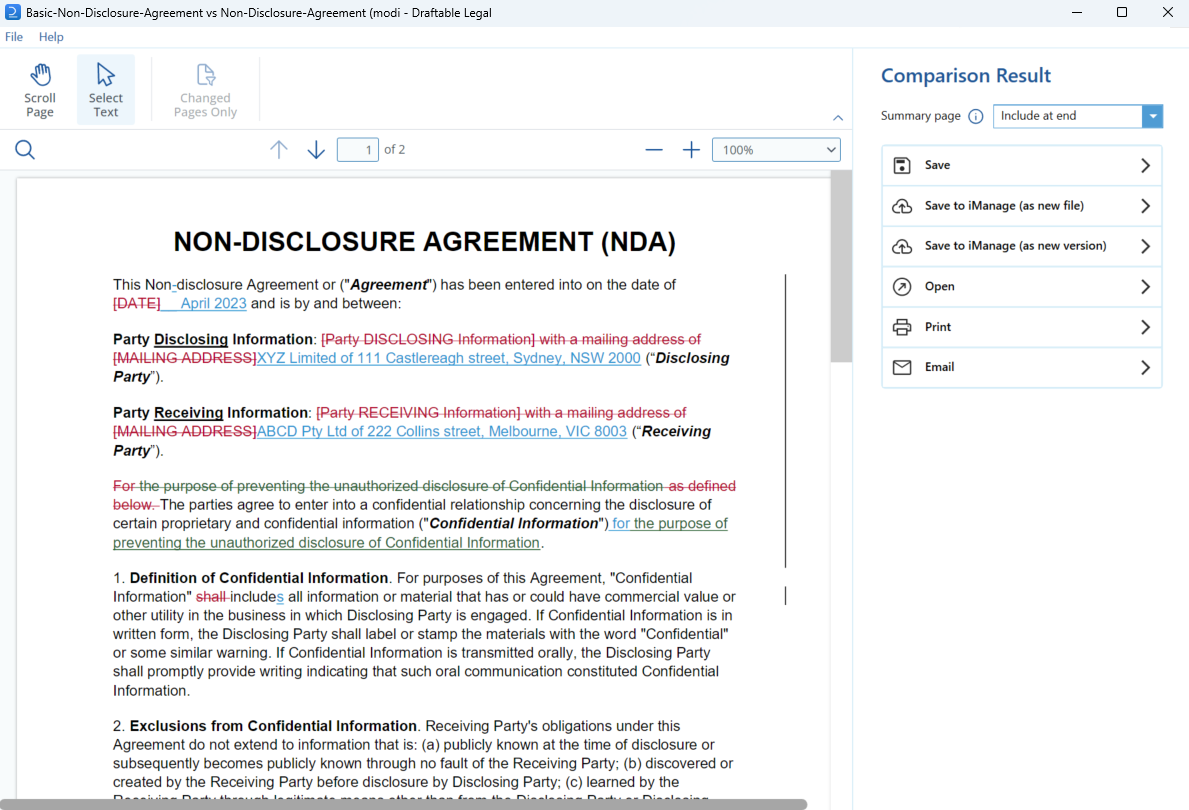
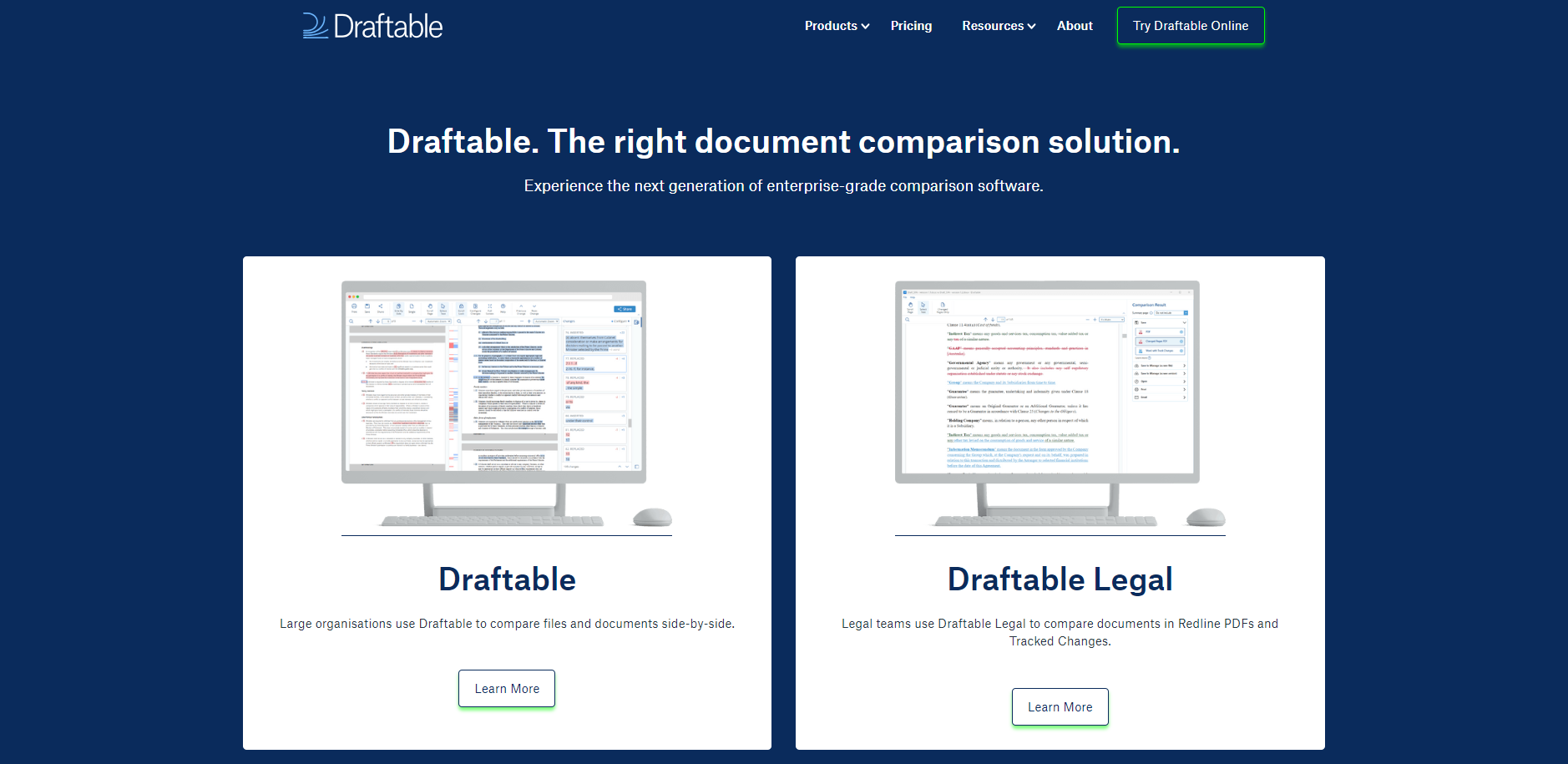
You may have noticed a change in the look of Draftable! The 2.10 releases included a makeover of our website, product and knowledge base UI. Underpinning this change was a move toward using industry-standard "blue" for insertions, "red" for deletions and "green" for moved text. In making the change, we took the opportunity to revise our branding and product colours to a new midnight blue theme.
Thanks to these efforts, our team is no longer seeing many environmental issues reported by customers. However, we remain committed to providing an exceptionally reliable product. If you encounter any issues with Draftable, please contact [support@draftable.com](mailto:support@draftable.com)
## A new blue theme to align UI with industry norms
You may have noticed a change in the look of Draftable! The 2.10 releases included a makeover of our website, product and knowledge base UI. Underpinning this change was a move toward using industry-standard "blue" for insertions, "red" for deletions and "green" for moved text. In making the change, we took the opportunity to revise our branding and product colours to a new midnight blue theme.