> ## Documentation Index
> Fetch the complete documentation index at: https://help.draftable.com/llms.txt
> Use this file to discover all available pages before exploring further.
# Release Notes: Draftable Legal – June 2025 (v25.6.0. 25.6.100, 25.6.200)
> We’re pleased to share the highlights from our series of June 2025 releases of **Draftable Legal (v25.6.0, v25.6.100 & v25.6.200)**. These updates added a significant number of improvements across core functionality, markup configuration options, workflow ease of use and integrations.
Here are the most valuable improvements in this release:
* **Finalize email changes faster** – our 'Redline in Email' add in now allows users to Accept / Reject changes in Outlook.
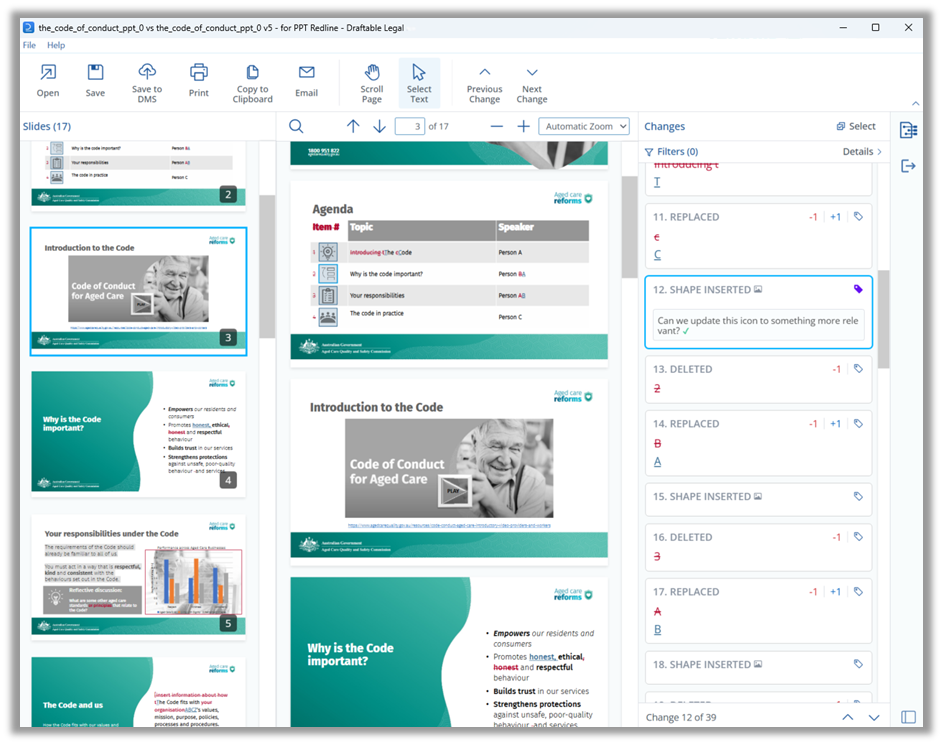
* **Review PowerPoint presentation changes faster** by opening PowerPoint files in Draftable with an interactive change list
* **Refresh results in one click** – users can now rerun an open comparison and pull the latest DMS versions without leaving the Viewer.
* **Switch markup profiles on demand** – switch Redline Profiles mid-review without restarting via a new ribbon command in the Comparison Viewer.
* **Save time comparing email attachments** by using 1-Click Compare from within Microsoft Outlook
Let’s explore these updates in more detail.
***But first, a note from our product team***
Our product improvements are the direct result of insights from our customers. We are extremely grateful for the excellent feedback we received which allowed the June 2025 release to be possible.
If you have feature ideas or product performance feedback, we would love to hear from you. Please share any suggestions with us by contacting [product@draftable.com](mailto:product@draftable.com).
## Core Functionality
### Redline in Email: Accept / Reject changes in Outlook emails
From v25.6.100, reviewers can **action email feedback immediately** by Accepting or Rejecting individual redlined edits directly inside the 'Redline in Email' Outlook add-in, eliminating the need for time consuming manual edits.
From our v25.6.200 update, users can **catch more subtle formatting change in email threads** thanks to improvements in identifying style-only edits (e.g. numbered list changes) and previously invisible empty-paragraph changes.
### Redline PowerPoint files using Draftable’s new PowerPoint Viewer
Users can now review redlined `.pptx` and `.ppt` files faster and more easily using Draftable’s new **PowerPoint viewer**. Changes are displayed with an interactive **clickable and filterable change list** to help users navigate between slide changes more easily. This allows faster review of presentation decks, pitch materials, and visual contracts.
 ## Accuracy and Quality
### Improved PDF detection for running OCR
**Our v25.6.100 update further enhanced OCR redlines on scanned PDFs** thanks to an updated Tungsten Automate configuration (powered by OmniPage) that improves PDF recognition and performance.
### Option to remove table-change layout bubbles in tracked changes
Lawyers and legal teams can now **export cleaner tracked-change documents** by enabling a new option (off by default and configured only by administrators) that automatically accepts table-layout changes, preventing empty revision balloons down the right-hand margin when printing to PDF.
## Markup Configuration
### Apply multiple text decorations to changes
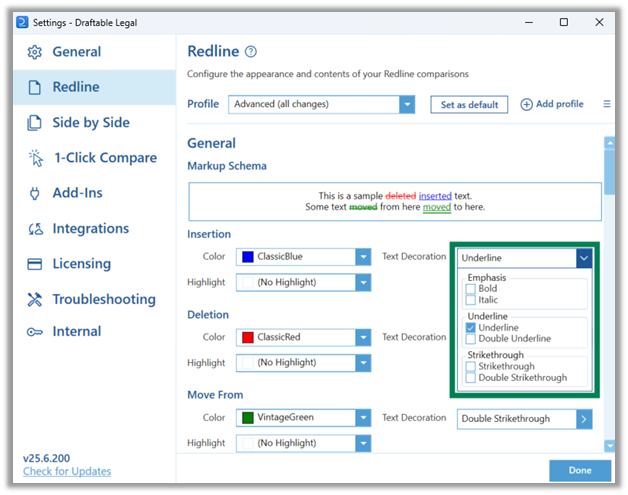
From v25.6.100, teams can **apply clearer, more flexible markup** by combining multiple text decorations—such as bold **and** underline—in a single schema, making key changes impossible to miss. The new options are available in the Redline settings menu under 'markup schema'.
## Accuracy and Quality
### Improved PDF detection for running OCR
**Our v25.6.100 update further enhanced OCR redlines on scanned PDFs** thanks to an updated Tungsten Automate configuration (powered by OmniPage) that improves PDF recognition and performance.
### Option to remove table-change layout bubbles in tracked changes
Lawyers and legal teams can now **export cleaner tracked-change documents** by enabling a new option (off by default and configured only by administrators) that automatically accepts table-layout changes, preventing empty revision balloons down the right-hand margin when printing to PDF.
## Markup Configuration
### Apply multiple text decorations to changes
From v25.6.100, teams can **apply clearer, more flexible markup** by combining multiple text decorations—such as bold **and** underline—in a single schema, making key changes impossible to miss. The new options are available in the Redline settings menu under 'markup schema'.
 ## Ease of use
### New option to refresh comparisons
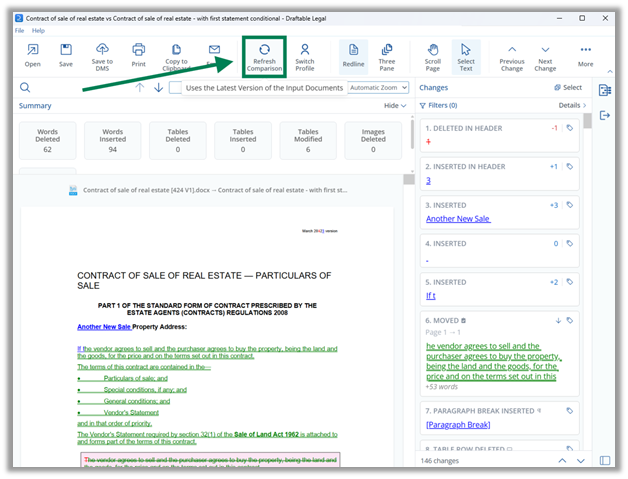
Users can now **stay in flow when source files evolve**: a new **Refresh Comparison** command in Draftable's Comparison Viewer will rerun the comparison with any updated input files that have been synced to the user's DMS. This removes several clicks from rerunning comparison workflows and removes the need to context switch to the New Comparison Window.
## Ease of use
### New option to refresh comparisons
Users can now **stay in flow when source files evolve**: a new **Refresh Comparison** command in Draftable's Comparison Viewer will rerun the comparison with any updated input files that have been synced to the user's DMS. This removes several clicks from rerunning comparison workflows and removes the need to context switch to the New Comparison Window.
 ### Switch profiles easily from the Comparison Viewer
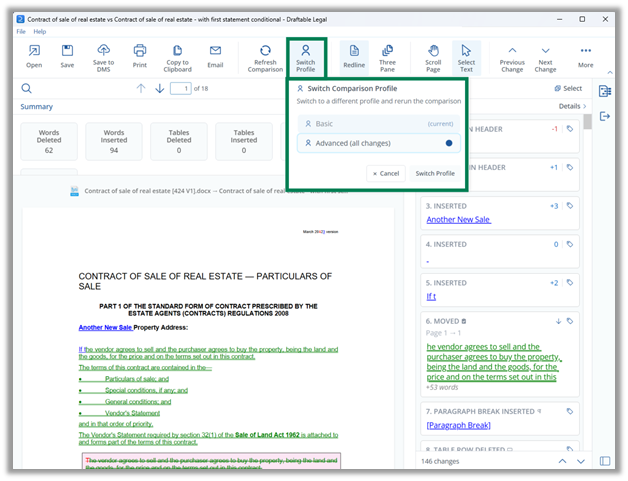
Reviewers **trial different markup rules on the fly** by switching Redline Profiles from the Viewer ribbon—no need to rerun the comparison from scratch.
### Switch profiles easily from the Comparison Viewer
Reviewers **trial different markup rules on the fly** by switching Redline Profiles from the Viewer ribbon—no need to rerun the comparison from scratch.
 ### New keyboard shortcuts
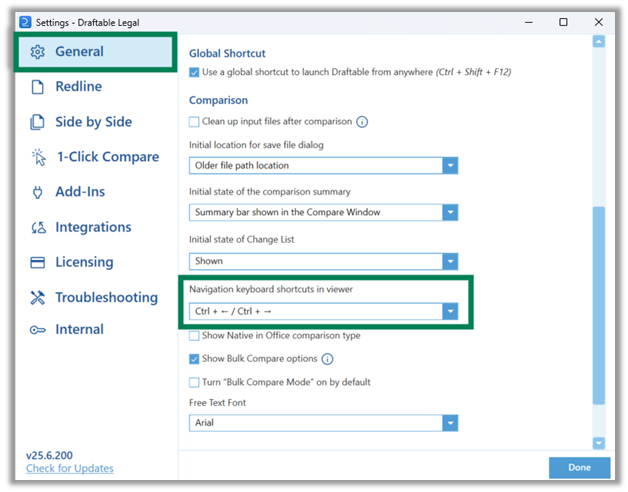
Keyboard-centric users **move through changes faster** with the default Ctrl + ← / Ctrl + → shortcuts to move between changes in the Comparison Viewer. Users are also provided with other keyboard shortcut options which can be adjusted in the Settings menu.
### New keyboard shortcuts
Keyboard-centric users **move through changes faster** with the default Ctrl + ← / Ctrl + → shortcuts to move between changes in the Comparison Viewer. Users are also provided with other keyboard shortcut options which can be adjusted in the Settings menu.
 ## Integration Functions
### 1-Click Compare attachments from Outlook
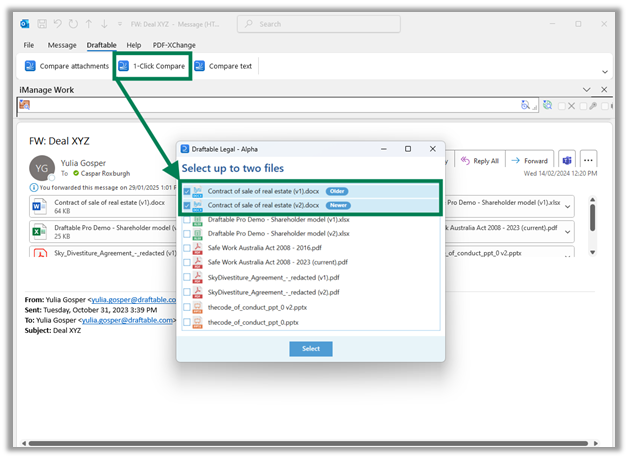
Draftable Legal’s **Outlook Add-In** now supports **1-Click Compare** for email attachments. This enhancement allows lawyers to immediately run redlines on incoming or outgoing files without needing to download and launch Draftable separately, streamlining inbox-based workflows.
## Integration Functions
### 1-Click Compare attachments from Outlook
Draftable Legal’s **Outlook Add-In** now supports **1-Click Compare** for email attachments. This enhancement allows lawyers to immediately run redlines on incoming or outgoing files without needing to download and launch Draftable separately, streamlining inbox-based workflows.
 ### Support reloading locally saved files via the Word Add-In
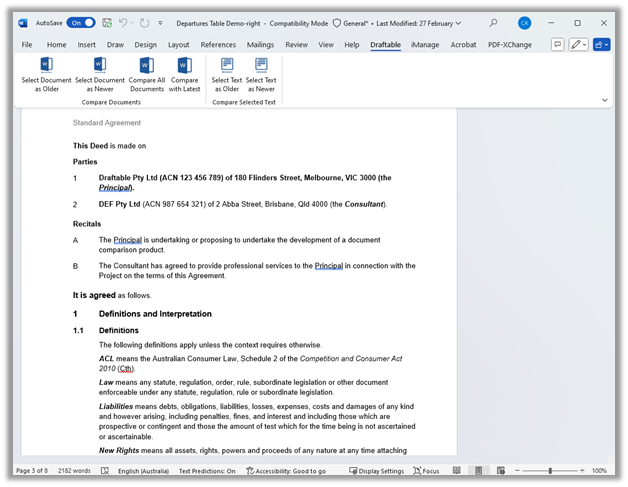
The **Draftable Word Add-In** now supports the ability to load locally-saved changes made to files retrieved from either **iManage** or **NetDocuments**. When a user opens a DMS file and saves changes locally (i.e. without syncing changes to their DMS), Draftable will identify those locally saved changes and include them when loading via the Draftable Word Add-In. This removes the need to 'save and sync' changes back to a DMS to run a comparison, enabling more flexible comparison workflows across editing sessions.
### Support reloading locally saved files via the Word Add-In
The **Draftable Word Add-In** now supports the ability to load locally-saved changes made to files retrieved from either **iManage** or **NetDocuments**. When a user opens a DMS file and saves changes locally (i.e. without syncing changes to their DMS), Draftable will identify those locally saved changes and include them when loading via the Draftable Word Add-In. This removes the need to 'save and sync' changes back to a DMS to run a comparison, enabling more flexible comparison workflows across editing sessions.
 ## Administrator features
### Improved detection of MSI failures
IT teams can avoid stalled **roll outs** after performance tuning of the MSI installer to allow detection potential looped processes at start-up and prompt users with clearer recovery steps.
## Bug Fixes
As with all updates, our June 2025 release series included important fixes for issues reported by our customers. Specific bugs addressed in these updates are:
* **System tray tooltip now displays correctly**, restoring visibility of Draftable’s running status
* **Malformed LISTNUM instructions** are now handled gracefully, preventing failures when comparing Word documents with broken list structures
* **Comparison stability has improved** by resolving errors caused by nested and complex field instructions during document serialization
* **Redline in Email now works when the HTTP Listener** **runs** as a Windows Service.
* **NetDocuments: “Save as attachment” and document-origin detection** issues resolved.
* **Restored ability to export Redline outputs to DOCX** from the Next Action menu.
* **“Export logs” troubleshooting command now completes** successfully.
* **“Select Version” now loads the correct older / newer side**.
* **Punctuation now exports correctly** in CSV Change Reports.
* **Cached header/footer numbering cleared** before comparison, ensuring accurate page-number redlines.
* **Moved-text notes and tags appear** in Departures Tables.
* **Text emphasis styles render correctly** on Summary pages and comments.
* **PowerPoint redlines now show moved objects and changes** in non-standard bullet lists.
If you are ever experiencing issues in Draftable, please contact [support@draftable.com](mailto:support@draftable.com) for further assistance.
## Administrator features
### Improved detection of MSI failures
IT teams can avoid stalled **roll outs** after performance tuning of the MSI installer to allow detection potential looped processes at start-up and prompt users with clearer recovery steps.
## Bug Fixes
As with all updates, our June 2025 release series included important fixes for issues reported by our customers. Specific bugs addressed in these updates are:
* **System tray tooltip now displays correctly**, restoring visibility of Draftable’s running status
* **Malformed LISTNUM instructions** are now handled gracefully, preventing failures when comparing Word documents with broken list structures
* **Comparison stability has improved** by resolving errors caused by nested and complex field instructions during document serialization
* **Redline in Email now works when the HTTP Listener** **runs** as a Windows Service.
* **NetDocuments: “Save as attachment” and document-origin detection** issues resolved.
* **Restored ability to export Redline outputs to DOCX** from the Next Action menu.
* **“Export logs” troubleshooting command now completes** successfully.
* **“Select Version” now loads the correct older / newer side**.
* **Punctuation now exports correctly** in CSV Change Reports.
* **Cached header/footer numbering cleared** before comparison, ensuring accurate page-number redlines.
* **Moved-text notes and tags appear** in Departures Tables.
* **Text emphasis styles render correctly** on Summary pages and comments.
* **PowerPoint redlines now show moved objects and changes** in non-standard bullet lists.
If you are ever experiencing issues in Draftable, please contact [support@draftable.com](mailto:support@draftable.com) for further assistance.