> ## Documentation Index
> Fetch the complete documentation index at: https://help.draftable.com/llms.txt
> Use this file to discover all available pages before exploring further.
# Configure an Organisation Identifier (Group Policy/Registry)
> This article is intended for IT administrators using Group Policy to configure Draftable Legal.
The **Configure an Organisation Identifier** policy setting allows organizations to include a unique identifier with all telemetry data sent from Draftable Legal.
## Overview
The **Configure an Organisation Identifier** setting lets administrators specify a unique **organization identifier (GUID)** that will be included in all telemetry events generated by Draftable Legal.
This identifier enables Draftable to associate telemetry data with your organization for reporting and analysis purposes.
No user-level **personally identifiable information (PII)** is collected or transmitted.
This policy is particularly useful for enterprise environments that require audit and reporting controls or where telemetry data is analyzed centrally.
## Group Policy Configuration
Once the latest Draftable Legal administrative templates have been installed (pulled from Draftable Legal v25.9.000), the policy can be found under:
```bash theme={null}
User Configuration > Administrative Templates > Draftable > Feature
```
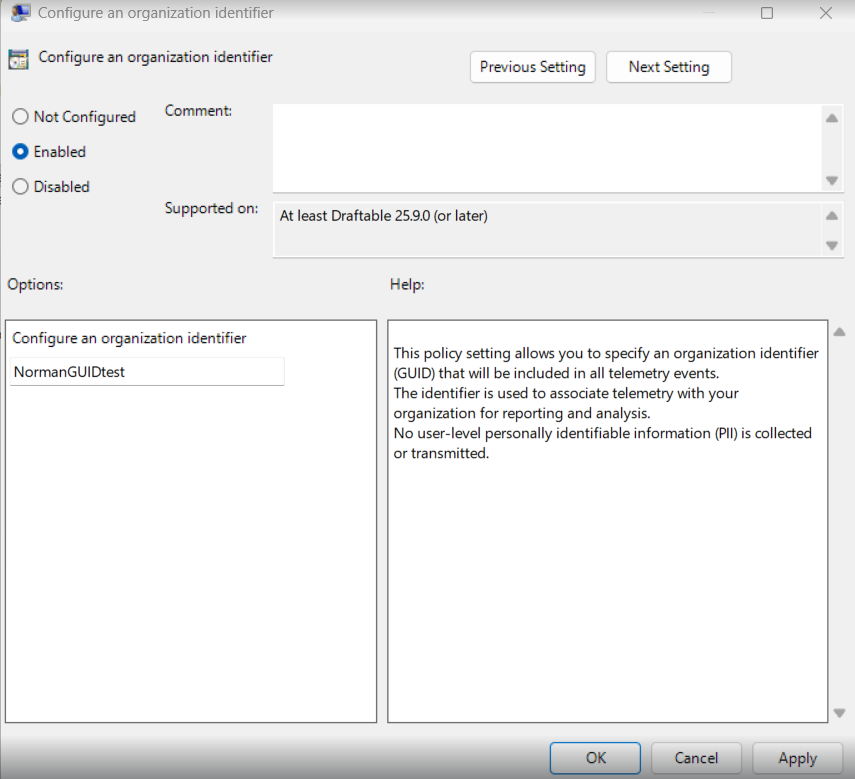
Policy Name: **Configure an Organisation Identifier**
When enabled, this setting allows you to enter a **string identifier** that represents your organization.\
The value entered here will be included in all telemetry events from Draftable Legal installations under this policy.
**Policy options:**
* **Not Configured / Disabled** – No organization identifier will be included in telemetry events.
* **Enabled** – Enter your organization's identifier string (GUID or text label) in the provided field.
 ## Registry Configuration
This policy can also be configured directly in the Windows Registry if Group Policy is not used.
**Registry path:**
```bash theme={null}
HKEY_CURRENT_USER\Software\Policies\Draftable\Feature
```
**Key name:** `OrganizationIdentifier`\
**Key type:** `REG_SZ`\
**Key value:** **(Your organization name or GUID)**
For example:
```bash theme={null}
"OrganizationIdentifier"="ContosoLegalTeam"
```
## Registry Configuration
This policy can also be configured directly in the Windows Registry if Group Policy is not used.
**Registry path:**
```bash theme={null}
HKEY_CURRENT_USER\Software\Policies\Draftable\Feature
```
**Key name:** `OrganizationIdentifier`\
**Key type:** `REG_SZ`\
**Key value:** **(Your organization name or GUID)**
For example:
```bash theme={null}
"OrganizationIdentifier"="ContosoLegalTeam"
```
 Additionally, this can be placed in the machine-wide level path, which would be:
```bash theme={null}
HKEY_LOCAL_MACHINE\Software\Policies\Draftable\Feature
```
## Notes
* This policy only affects telemetry data used for diagnostic and product improvement purposes.
* Draftable does **not** collect or transmit any user-level personally identifiable information (PII).
* The identifier is for organizational grouping only and will not affect product functionality or licensing.
Additionally, this can be placed in the machine-wide level path, which would be:
```bash theme={null}
HKEY_LOCAL_MACHINE\Software\Policies\Draftable\Feature
```
## Notes
* This policy only affects telemetry data used for diagnostic and product improvement purposes.
* Draftable does **not** collect or transmit any user-level personally identifiable information (PII).
* The identifier is for organizational grouping only and will not affect product functionality or licensing.