> ## Documentation Index
> Fetch the complete documentation index at: https://help.draftable.com/llms.txt
> Use this file to discover all available pages before exploring further.
# Using the Draftable API Explorer
> The API Explorer is an interactive reference at api.draftable.com where you can read every endpoint's parameters and run real requests against your test account from the browser.
The **API Explorer** is an interactive reference for every Draftable API endpoint, hosted at [api.draftable.com/api-explorer](https://api.draftable.com/api-explorer).
It does two jobs. It documents each endpoint's parameters and responses in full, and it lets you **run real requests from your browser** without writing any code. It is the fastest way to understand the API before you build against it, and a useful way to check behaviour when something is not working as you expect.
 ## What you can do with it
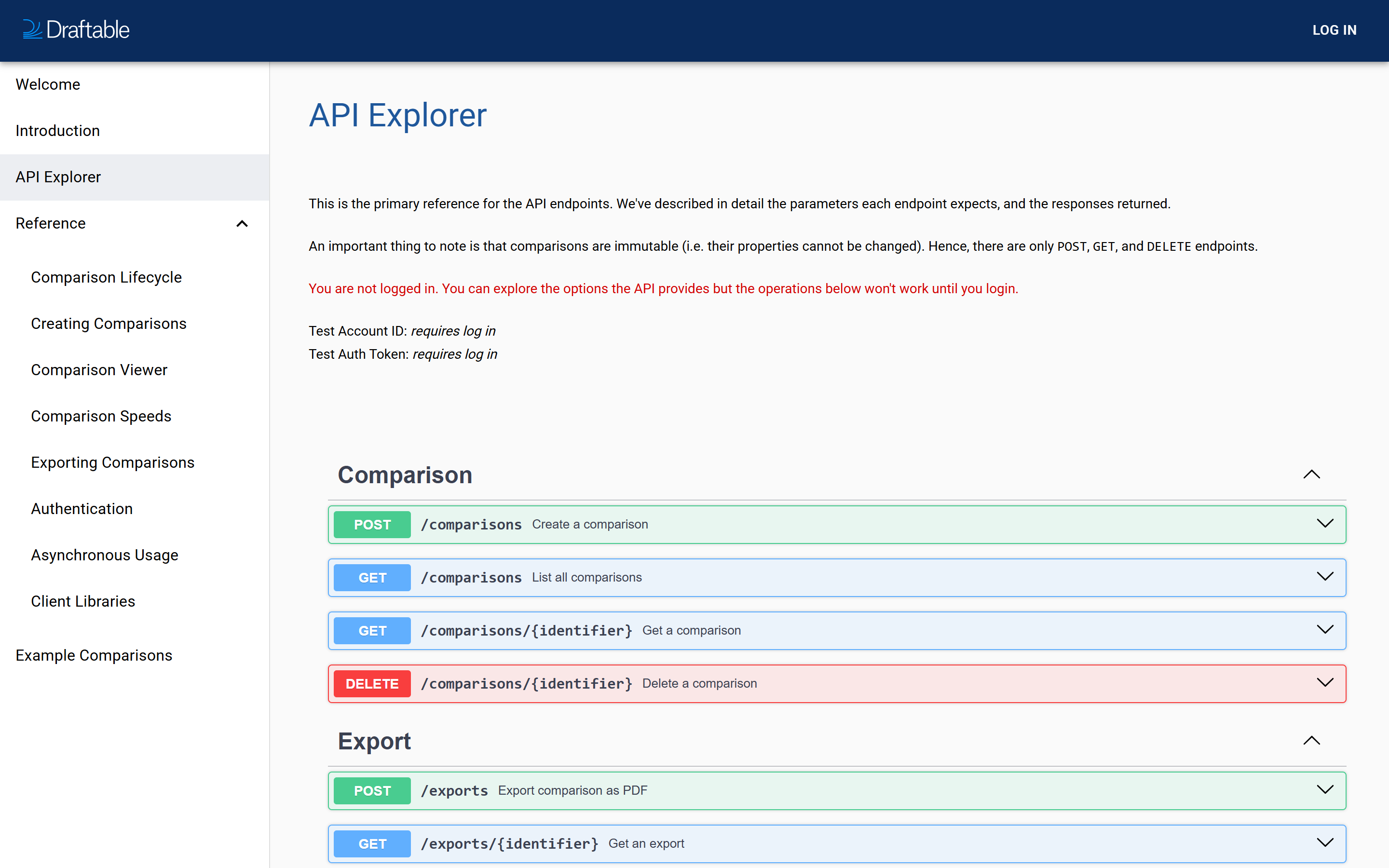
The Explorer lists all six API operations, grouped into **Comparison** and **Export**:
| Method | Endpoint | Operation |
| :----- | :-------------------------- | :----------------------- |
| POST | `/comparisons` | Create a comparison |
| GET | `/comparisons` | List all comparisons |
| GET | `/comparisons/{identifier}` | Get a comparison |
| DELETE | `/comparisons/{identifier}` | Delete a comparison |
| POST | `/exports` | Export comparison as PDF |
| GET | `/exports/{identifier}` | Get an export |
That is the complete API surface. Comparisons are **immutable**, meaning their properties cannot be changed once created, which is why there are only POST, GET and DELETE operations and no PATCH or PUT.
## Logged out versus logged in
This is the part worth understanding before you start.
| | Logged out | Logged in |
| :------------------------------------- | :--------- | :-------------------------- |
| Read endpoint documentation | ✅ | ✅ |
| See parameters and example responses | ✅ | ✅ |
| Credentials shown on the page | ❌ | ✅ Your **test** credentials |
| Run a real request with **Try it out** | ❌ | ✅ |
Logged out, the Explorer displays a notice reading *"You are not logged in. You can explore the options the API provides but the operations below won't work until you login."* Everything is still readable, so it is perfectly usable as a reference without an account.
Once you sign in, your **Test Account ID** and **Test Auth Token** appear at the top of the page, and the **Try it out** buttons become live.
Because the page displays your **test auth token in plain text** when you are signed in, take care when screen sharing, presenting, or taking screenshots of the API Explorer. Treat it the way you would any credentials page.
### It always uses your test account
This is the single most important thing to know about the Explorer, and it is a deliberate safety measure.
Requests you run from the API Explorer are authenticated with your **test credentials only**. There is no way to run a production request from the Explorer. Your live comparisons and production traffic cannot be affected by anything you do here.
That makes the Explorer safe to experiment in. It does not make it consequence-free: the requests are **real**. A comparison you create appears in your test stream, and a comparison you delete is genuinely deleted. See [Test and production accounts](/hc/en-us/articles/Draftable-API-test-and-production-accounts) for how the two streams relate.
## Running a request
Select **LOG IN** at the top right. Your test credentials then appear at the top of the Explorer page.
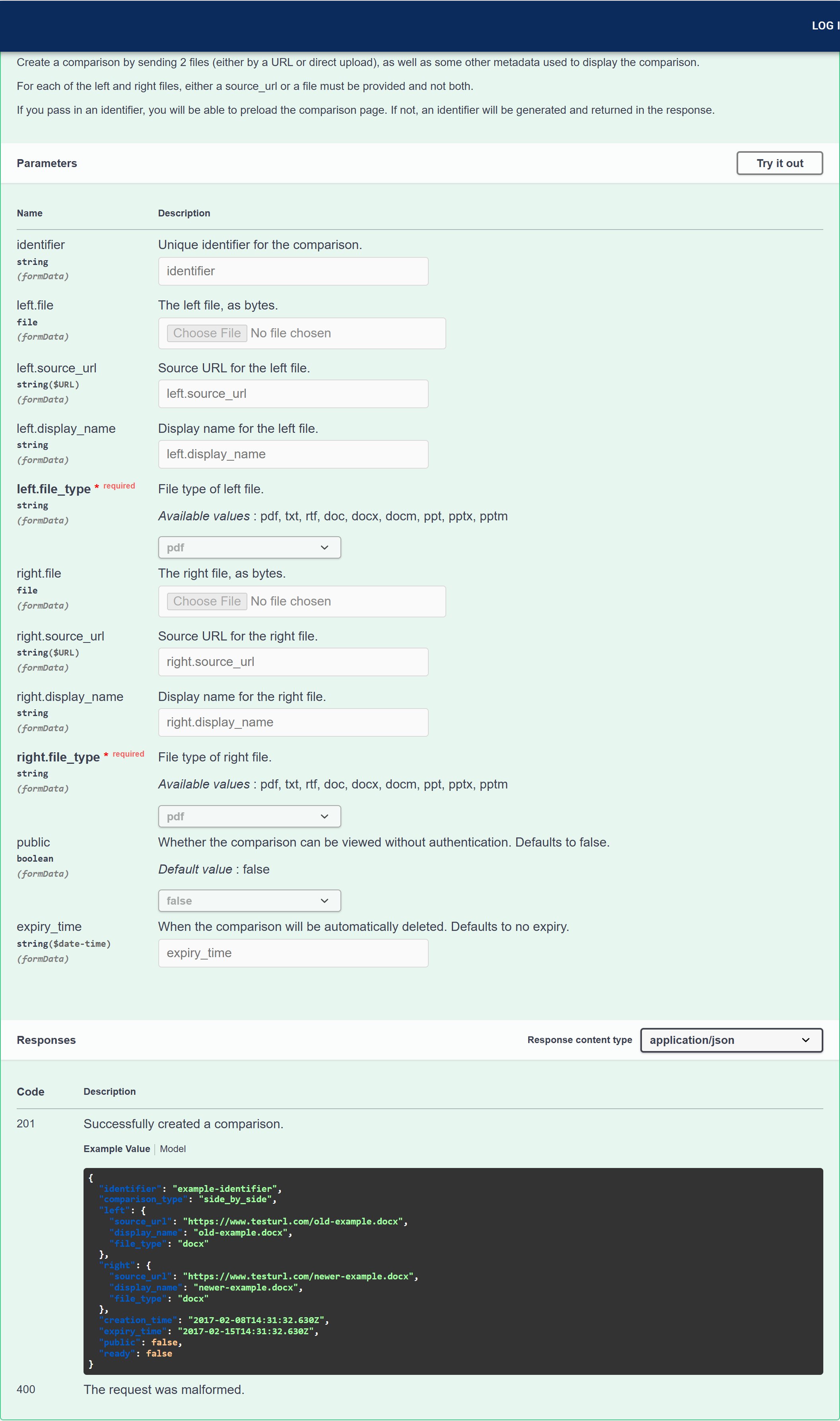
Select any operation row to expand it. You will see its description, every parameter with its type and whether it is required, and the possible responses.
This unlocks the parameter fields so you can enter values.
Required parameters are marked. For `POST /comparisons` you must supply `left.file_type` and `right.file_type`, plus either a file or a source URL for each side.
The Explorer sends the request and shows you the response code, the response body, and the equivalent `curl` command.
## What you can do with it
The Explorer lists all six API operations, grouped into **Comparison** and **Export**:
| Method | Endpoint | Operation |
| :----- | :-------------------------- | :----------------------- |
| POST | `/comparisons` | Create a comparison |
| GET | `/comparisons` | List all comparisons |
| GET | `/comparisons/{identifier}` | Get a comparison |
| DELETE | `/comparisons/{identifier}` | Delete a comparison |
| POST | `/exports` | Export comparison as PDF |
| GET | `/exports/{identifier}` | Get an export |
That is the complete API surface. Comparisons are **immutable**, meaning their properties cannot be changed once created, which is why there are only POST, GET and DELETE operations and no PATCH or PUT.
## Logged out versus logged in
This is the part worth understanding before you start.
| | Logged out | Logged in |
| :------------------------------------- | :--------- | :-------------------------- |
| Read endpoint documentation | ✅ | ✅ |
| See parameters and example responses | ✅ | ✅ |
| Credentials shown on the page | ❌ | ✅ Your **test** credentials |
| Run a real request with **Try it out** | ❌ | ✅ |
Logged out, the Explorer displays a notice reading *"You are not logged in. You can explore the options the API provides but the operations below won't work until you login."* Everything is still readable, so it is perfectly usable as a reference without an account.
Once you sign in, your **Test Account ID** and **Test Auth Token** appear at the top of the page, and the **Try it out** buttons become live.
Because the page displays your **test auth token in plain text** when you are signed in, take care when screen sharing, presenting, or taking screenshots of the API Explorer. Treat it the way you would any credentials page.
### It always uses your test account
This is the single most important thing to know about the Explorer, and it is a deliberate safety measure.
Requests you run from the API Explorer are authenticated with your **test credentials only**. There is no way to run a production request from the Explorer. Your live comparisons and production traffic cannot be affected by anything you do here.
That makes the Explorer safe to experiment in. It does not make it consequence-free: the requests are **real**. A comparison you create appears in your test stream, and a comparison you delete is genuinely deleted. See [Test and production accounts](/hc/en-us/articles/Draftable-API-test-and-production-accounts) for how the two streams relate.
## Running a request
Select **LOG IN** at the top right. Your test credentials then appear at the top of the Explorer page.
Select any operation row to expand it. You will see its description, every parameter with its type and whether it is required, and the possible responses.
This unlocks the parameter fields so you can enter values.
Required parameters are marked. For `POST /comparisons` you must supply `left.file_type` and `right.file_type`, plus either a file or a source URL for each side.
The Explorer sends the request and shows you the response code, the response body, and the equivalent `curl` command.
 The generated `curl` command is the most useful output on the page. Get a request working in the Explorer, then copy that command as the starting point for your own integration.
## Reading the parameter list
The expanded view is the authoritative reference for each endpoint. For `POST /comparisons` it shows, among others:
* `left.file` and `right.file` — the documents as file uploads
* `left.source_url` and `right.source_url` — URLs for Draftable to fetch instead
* `left.file_type` and `right.file_type` — **required**, with the accepted values listed
* `left.display_name` and `right.display_name` — the labels shown in the viewer
* `identifier`, `public` and `expiry_time` — optional comparison settings
For a fuller explanation of what each one does and when to use it, see [Creating a comparison](/hc/en-us/articles/Draftable-API-creating-a-comparison).
The parameter list adapts to your account. If your plan has **redline comparisons** enabled, an extra `comparison_type` parameter appears, letting you choose between `side_by_side` and `redline`. If you do not see it, your plan does not include redline output.
## The rest of the documentation site
The Explorer sits alongside a set of reference pages on the same site, reachable from the left-hand navigation:
| Page | Covers |
| :-------------------- | :---------------------------------------------------- |
| Introduction | An overview of the API |
| Comparison Lifecycle | Creating, checking status, viewing and deleting |
| Creating Comparisons | Submitting files and supported file types |
| Comparison Viewer | Viewer URLs and embedding comparisons in your app |
| Comparison Speeds | Expected comparison times and batch processing |
| Exporting Comparisons | Creating exports and polling for the result |
| Authentication | Account credentials and authenticating requests |
| Asynchronous Usage | Working with the API's asynchronous behaviour |
| Client Libraries | The official .NET, Java, Python and Node.js libraries |
| Example Comparisons | Live sample comparisons you can open |
## Getting a raw copy of the specification
The Explorer is generated from an OpenAPI specification, which you can download directly:
```
https://api.draftable.com/api-explorer/spec
```
This is useful if you want to generate a client from the specification, import the API into a tool such as Postman or Insomnia, or keep a copy alongside your integration code.
The specification is generated per request and reflects **your** account, so download it while signed in if you want it to include plan-specific parameters such as `comparison_type`.
## When to use the Explorer, and when not to
**Reach for the Explorer when** you are learning the API, checking exactly which parameters an endpoint accepts, reproducing a problem by hand, or confirming what a response looks like.
**Do not use it for** production work, load testing, or bulk operations. It is a browser tool bound to your test credentials, not an integration path.
## Related articles
The generated `curl` command is the most useful output on the page. Get a request working in the Explorer, then copy that command as the starting point for your own integration.
## Reading the parameter list
The expanded view is the authoritative reference for each endpoint. For `POST /comparisons` it shows, among others:
* `left.file` and `right.file` — the documents as file uploads
* `left.source_url` and `right.source_url` — URLs for Draftable to fetch instead
* `left.file_type` and `right.file_type` — **required**, with the accepted values listed
* `left.display_name` and `right.display_name` — the labels shown in the viewer
* `identifier`, `public` and `expiry_time` — optional comparison settings
For a fuller explanation of what each one does and when to use it, see [Creating a comparison](/hc/en-us/articles/Draftable-API-creating-a-comparison).
The parameter list adapts to your account. If your plan has **redline comparisons** enabled, an extra `comparison_type` parameter appears, letting you choose between `side_by_side` and `redline`. If you do not see it, your plan does not include redline output.
## The rest of the documentation site
The Explorer sits alongside a set of reference pages on the same site, reachable from the left-hand navigation:
| Page | Covers |
| :-------------------- | :---------------------------------------------------- |
| Introduction | An overview of the API |
| Comparison Lifecycle | Creating, checking status, viewing and deleting |
| Creating Comparisons | Submitting files and supported file types |
| Comparison Viewer | Viewer URLs and embedding comparisons in your app |
| Comparison Speeds | Expected comparison times and batch processing |
| Exporting Comparisons | Creating exports and polling for the result |
| Authentication | Account credentials and authenticating requests |
| Asynchronous Usage | Working with the API's asynchronous behaviour |
| Client Libraries | The official .NET, Java, Python and Node.js libraries |
| Example Comparisons | Live sample comparisons you can open |
## Getting a raw copy of the specification
The Explorer is generated from an OpenAPI specification, which you can download directly:
```
https://api.draftable.com/api-explorer/spec
```
This is useful if you want to generate a client from the specification, import the API into a tool such as Postman or Insomnia, or keep a copy alongside your integration code.
The specification is generated per request and reflects **your** account, so download it while signed in if you want it to include plan-specific parameters such as `comparison_type`.
## When to use the Explorer, and when not to
**Reach for the Explorer when** you are learning the API, checking exactly which parameters an endpoint accepts, reproducing a problem by hand, or confirming what a response looks like.
**Do not use it for** production work, load testing, or bulk operations. It is a browser tool bound to your test credentials, not an integration path.
## Related articles