> ## Documentation Index
> Fetch the complete documentation index at: https://help.draftable.com/llms.txt
> Use this file to discover all available pages before exploring further.
# Setting a default comparison type
> Remember your last output choice or always start with a preferred output in Draftable Legal, and configure organisation defaults with Group Policy.
*Available from version 26.10.0*
Choose how Draftable Legal selects the comparison type when you start a new comparison. You can remember your last choice or always start with a particular type.
## Choose your default
You need Draftable Legal version 26.10.0 or later.
Open **Settings**, select **Compare Selector**, and find the **Workflow** section.
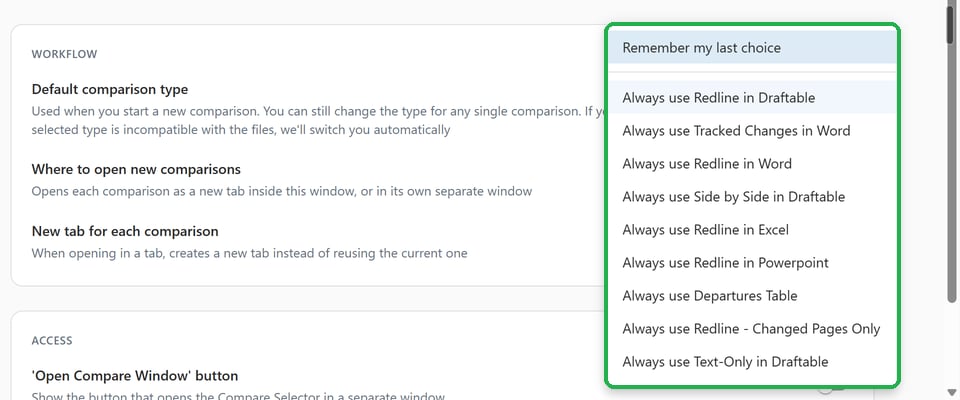
In **Default comparison type**, choose one of the following:
* **Remember my last choice**: This is the default setting. Draftable saves the type you select on the New Comparison screen and uses it for your next comparison.
* **Always use** a particular type: For example, **Always use Tracked Changes in Word** starts each new comparison with that type. You can still choose a different type for a single comparison without changing your saved default.
 Your selected type stays selected when you add or replace files, change a document version in a document management system (DMS), enter text, or clear all files. These actions no longer reset your choice to Redline.
For help choosing an output, see [Comparison types in Draftable Legal](/hc/en-us/articles/33190528521881-Comparison-Type-How-to-choose-the-right-option-in-the-Draftable-New-Comparison-Window).
## When your files need a different type
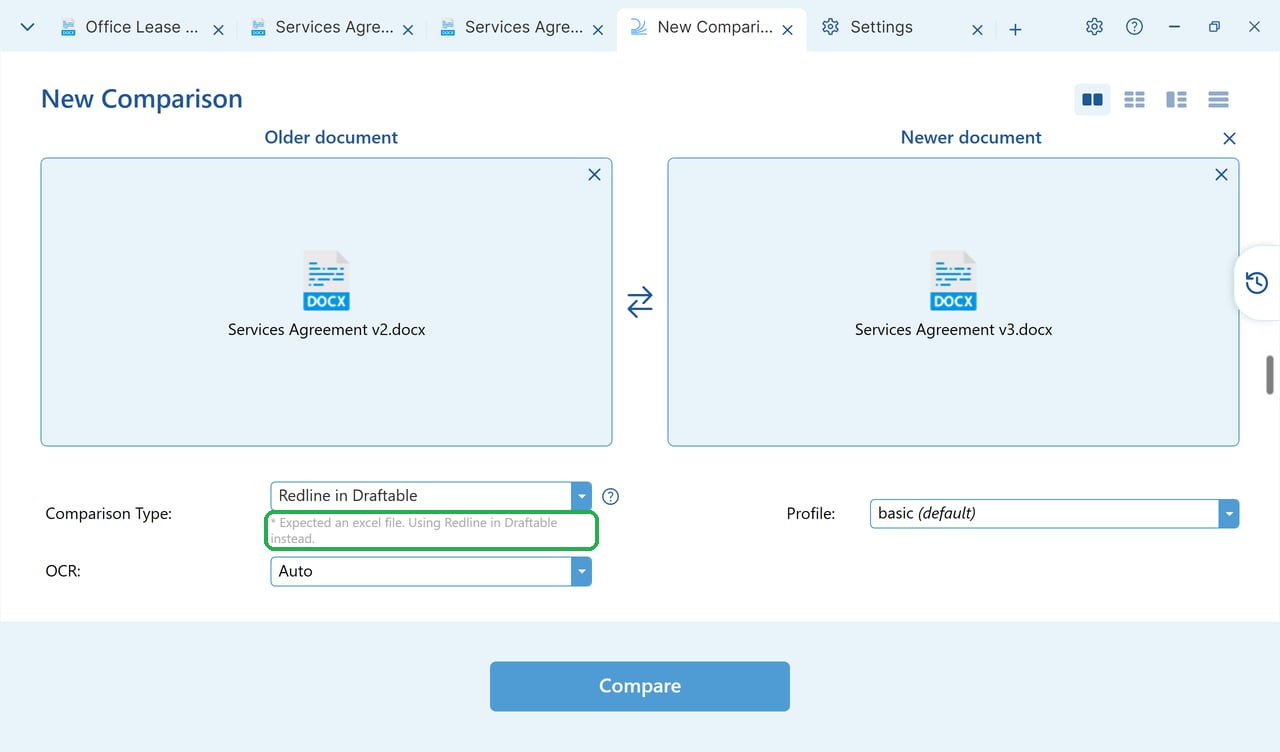
Some comparison types cannot compare every combination of files. If your selected type cannot run on the loaded files, Draftable temporarily uses an available alternative, preferring **Redline in Draftable**, then **Side by Side in Draftable**.
Once the files are loaded, a grey line below the comparison type dropdown explains the reason and the alternative being used. It follows this format: `* . Using instead.`
This temporary switch does not overwrite your saved default. Draftable returns to your original choice when the files support it again, unless you select another type.
Your selected type stays selected when you add or replace files, change a document version in a document management system (DMS), enter text, or clear all files. These actions no longer reset your choice to Redline.
For help choosing an output, see [Comparison types in Draftable Legal](/hc/en-us/articles/33190528521881-Comparison-Type-How-to-choose-the-right-option-in-the-Draftable-New-Comparison-Window).
## When your files need a different type
Some comparison types cannot compare every combination of files. If your selected type cannot run on the loaded files, Draftable temporarily uses an available alternative, preferring **Redline in Draftable**, then **Side by Side in Draftable**.
Once the files are loaded, a grey line below the comparison type dropdown explains the reason and the alternative being used. It follows this format: `* . Using instead.`
This temporary switch does not overwrite your saved default. Draftable returns to your original choice when the files support it again, unless you select another type.
 ## If your organisation sets the default
Your administrator can suggest a default or enforce one. If it is enforced, **Default comparison type** is locked in Settings and shows **Set by your organisation**. You can still change the type for a single comparison on the New Comparison screen. Your next comparison starts from the enforced default.
## Configure defaults for your organisation
Use Draftable Legal version 26.10.0 or later and its updated Group Policy templates. The policies are available in both User Configuration and Computer Configuration.
| Group Policy display name | Registry value | Purpose |
| :- | :- | :- |
| **Default comparison type** | `AdminDefaultComparisonOutput` | Choose the type users start with on the New Comparison screen. |
| **Default comparison type enforcement** | `AdminDefaultComparisonOutputStrategy` | Choose whether users can change their default in Settings. |
The enforcement options are:
* **Suggest (users can change it)**, registry value `Suggest`: This is the default strategy. The suggestion applies only when the user has no usable saved default. In practice, it usually reaches fresh profiles only, because earlier versions already saved a default for existing users. It does not replace an existing usable preference.
* **Enforce (locked)**, registry value `Enforce`: Applies the configured default to both existing and new users and locks the setting. The dropdown for an individual comparison remains editable.
The enforcement policy has no effect unless you also configure an available **Default comparison type**. A type unavailable because of licensing or disabled outputs is skipped. A type that is available but incompatible with the current files uses the temporary fallback described above.
### Registry configuration
Both values are `REG_SZ` under `Software\Policies\Draftable\Feature`. Use `HKCU` for a user policy or `HKLM` for a computer policy. If both are set, the user policy takes precedence.
```bash theme={null}
Key: HKCU:\Software\Policies\Draftable\Feature
Value name: AdminDefaultComparisonOutput
Value type: REG_SZ
Value data: TrackChangesWord
```
```bash theme={null}
Key: HKCU:\Software\Policies\Draftable\Feature
Value name: AdminDefaultComparisonOutputStrategy
Value type: REG_SZ
Value data: Enforce
```
This example enforces **Tracked Changes in Word** as the default. To suggest it instead, use `Suggest` for `AdminDefaultComparisonOutputStrategy`.
| Comparison type in Group Policy | Value for AdminDefaultComparisonOutput |
| :- | :- |
| Redline in Draftable | `Redline` |
| Tracked Changes in Word | `TrackChangesWord` |
| Redline in Word | `RedlineDocx` |
| Side by Side in Draftable | `Draftable` |
| Redline in Excel | `RedlineExcel` |
| Redline in Powerpoint | `RedlinePowerpoint` |
| Departures Table | `DeparturesTable` |
| Redline - Changed Pages Only | `ChangedPages` |
| Text-Only in Draftable | `TextOnly` |
| Native in MS Office | `NativeOffice` |
### Replace older registry defaults
From version 26.10.0, `InitialComparisonOutput` no longer has any effect. There is no automatic migration. Replace it with `AdminDefaultComparisonOutput` and use `AdminDefaultComparisonOutputStrategy` set to `Enforce` if it must apply to existing users.
`DefaultComparisonOutput` is now a user-only preference. Copies in policy hives are ignored. Use the administrator policies above instead.
To limit which outputs users can choose, see [How to configure comparison types and outputs](/hc/en-us/articles/35240737941913-How-to-configure-Comparison-Types-and-Outputs-Remove-options-or-set-initial-default).
This documentation is built and hosted on [Mintlify](https://mintlify.com), a developer documentation platform.
## If your organisation sets the default
Your administrator can suggest a default or enforce one. If it is enforced, **Default comparison type** is locked in Settings and shows **Set by your organisation**. You can still change the type for a single comparison on the New Comparison screen. Your next comparison starts from the enforced default.
## Configure defaults for your organisation
Use Draftable Legal version 26.10.0 or later and its updated Group Policy templates. The policies are available in both User Configuration and Computer Configuration.
| Group Policy display name | Registry value | Purpose |
| :- | :- | :- |
| **Default comparison type** | `AdminDefaultComparisonOutput` | Choose the type users start with on the New Comparison screen. |
| **Default comparison type enforcement** | `AdminDefaultComparisonOutputStrategy` | Choose whether users can change their default in Settings. |
The enforcement options are:
* **Suggest (users can change it)**, registry value `Suggest`: This is the default strategy. The suggestion applies only when the user has no usable saved default. In practice, it usually reaches fresh profiles only, because earlier versions already saved a default for existing users. It does not replace an existing usable preference.
* **Enforce (locked)**, registry value `Enforce`: Applies the configured default to both existing and new users and locks the setting. The dropdown for an individual comparison remains editable.
The enforcement policy has no effect unless you also configure an available **Default comparison type**. A type unavailable because of licensing or disabled outputs is skipped. A type that is available but incompatible with the current files uses the temporary fallback described above.
### Registry configuration
Both values are `REG_SZ` under `Software\Policies\Draftable\Feature`. Use `HKCU` for a user policy or `HKLM` for a computer policy. If both are set, the user policy takes precedence.
```bash theme={null}
Key: HKCU:\Software\Policies\Draftable\Feature
Value name: AdminDefaultComparisonOutput
Value type: REG_SZ
Value data: TrackChangesWord
```
```bash theme={null}
Key: HKCU:\Software\Policies\Draftable\Feature
Value name: AdminDefaultComparisonOutputStrategy
Value type: REG_SZ
Value data: Enforce
```
This example enforces **Tracked Changes in Word** as the default. To suggest it instead, use `Suggest` for `AdminDefaultComparisonOutputStrategy`.
| Comparison type in Group Policy | Value for AdminDefaultComparisonOutput |
| :- | :- |
| Redline in Draftable | `Redline` |
| Tracked Changes in Word | `TrackChangesWord` |
| Redline in Word | `RedlineDocx` |
| Side by Side in Draftable | `Draftable` |
| Redline in Excel | `RedlineExcel` |
| Redline in Powerpoint | `RedlinePowerpoint` |
| Departures Table | `DeparturesTable` |
| Redline - Changed Pages Only | `ChangedPages` |
| Text-Only in Draftable | `TextOnly` |
| Native in MS Office | `NativeOffice` |
### Replace older registry defaults
From version 26.10.0, `InitialComparisonOutput` no longer has any effect. There is no automatic migration. Replace it with `AdminDefaultComparisonOutput` and use `AdminDefaultComparisonOutputStrategy` set to `Enforce` if it must apply to existing users.
`DefaultComparisonOutput` is now a user-only preference. Copies in policy hives are ignored. Use the administrator policies above instead.
To limit which outputs users can choose, see [How to configure comparison types and outputs](/hc/en-us/articles/35240737941913-How-to-configure-Comparison-Types-and-Outputs-Remove-options-or-set-initial-default).
This documentation is built and hosted on [Mintlify](https://mintlify.com), a developer documentation platform.