

- Redesigned file list — Profile, Convert, and Search move to the top bar, with per-file drag handles and inline quick actions for faster batch workflows
- Expanded Group Policy template — admins can enable iManage and NetDocuments, set server URLs and automatic sign-in, pre-accept Terms & Conditions, and configure telemetry without hand-editing the registry
- NetDocuments identity fix — Draftable Clean now appears as itself in NetDocuments instead of Draftable Compare, reducing unexpected re-authentication when loading files
- Organisation-level telemetry tagging — administrators can supply an organization identifier (GUID) via Group Policy so usage data can be attributed at the organisation level without personal information
- Hyperlinks in Word documents — hyperlinks in
.docxfiles are detected during scan and can be preserved or removed according to your cleaning profile
Ease of Use
Redesigned file list
The desktop application’s file list has been refreshed for a cleaner, more efficient workflow. Profile, Convert, and Search now sit in the top bar alongside your DMS and Clean actions, making batch operations easier to find. Each file row includes a drag handle for reordering, inline profile selection, a per-file PDF icon for flagging conversion (the icon turns blue when flagged), and updated remove controls. The active profile for your selection is also shown in the status area at the bottom of the window.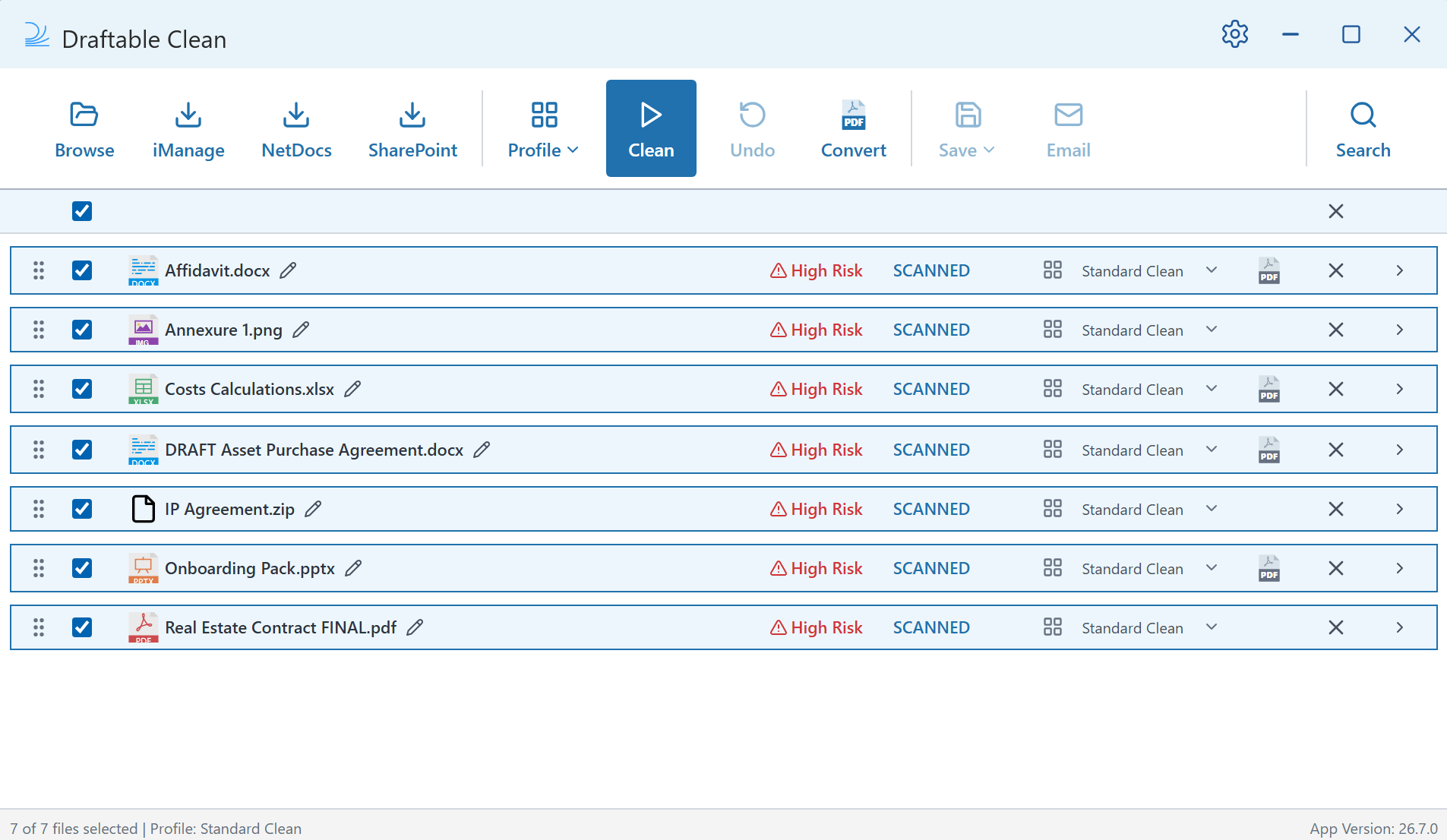
Admin Configuration
Expanded Group Policy template
Several settings that Draftable Clean already supported via registry are now exposed in the Group Policy (ADMX/ADML) template, matching the experience administrators expect from Draftable Desktop (Compare). Newly surfaced policies include:- iManage — enable integration, set the server URL, and configure automatic sign-in
- NetDocuments — enable integration and configure automatic check-in
- Terms & Conditions — pre-accept for silent or managed rollouts
- Telemetry — configure statistics acknowledgement centrally
Organisation-level telemetry tagging
Administrators can now configure an organization identifier (GUID) via Group Policy. When set, this value is included in Draftable Clean telemetry events, enabling organisation-level attribution with no user-level personal information. The setting follows the same pattern as Draftable Desktop (Compare): it is policy-controlled only and is not exposed in the end-user Settings UI. When the policy is unset, telemetry behaviour is unchanged.Integrations
NetDocuments application identity
Draftable Clean previously reused the NetDocuments application identity associated with Draftable Compare, which could cause the integration to appear as Draftable Compare and prompt users to sign in again when adding files. v26.6.100 registers Draftable Clean with its own NetDocuments application identity, so the integration is correctly labelled throughout the NetDocuments flow and sign-in is more consistent when loading documents for cleaning.Core Functionality
Hyperlinks in Word documents
Draftable Clean now detects hyperlinks in Word (.docx) documents during scan. Hyperlinks may point to internal or sensitive URLs, so they appear in the review workflow alongside other metadata types and can be preserved or removed according to your active cleaning profile.
If you ever need help troubleshooting issues with Draftable Clean, please reach out to support@draftable.com.