

Excel (
.xlsx), PowerPoint (.pptx), and image file support were added in v26.6.0 (June 2026). See the v26.6.0 release notes for the full list of changes.Document files (Word, Excel, PowerPoint, and PDF)
Word, Excel, PowerPoint, and PDF files are scanned individually and assigned a risk rating based on the metadata detected. Each file can be expanded to review its metadata categories before cleaning, and cleaning behaviour is controlled through your cleaning profiles.- Excel (
.xlsx) — Workbooks are scanned and cleaned using the same review workflow as Word and PDF files. Excel-specific metadata — such as formula cell references — can be reviewed in the viewer. - PowerPoint (
.pptx) — Presentations are scanned and cleaned using the same risk-rated workflow, with PowerPoint-specific metadata available for review before cleaning.
Password-protected files
Draftable Clean supports password-protected Word and PDF files. If a file requires a password, it will display a PASSWORD status badge (highlighted in orange) and show a Password Required prompt. Enter the password and click Check Password to authenticate. If the password is correct, the file is scanned and its status changes to SCANNED with a risk rating. If the password is incorrect, a Password Invalid message is displayed — re-enter the correct password and click Check Password again.Cryptographically signed PDF files
When Draftable Clean detects a cryptographic digital signature in a PDF file, the file cannot be cleaned. This is by design — removing or modifying metadata would invalidate the signature, as it proves that part or all of the document is unchanged. To preserve signature integrity, Draftable Clean skips cleaning for these files.This applies specifically to cryptographic digital signatures, not to visual signatures or annotations created with tools like Adobe Fill & Sign. Those are standard document content (text and image objects) and do not prevent cleaning.
Images embedded in PDF files
PDF files often contain embedded images that carry metadata of their own. Draftable Clean scans these images and removes their metadata according to the active cleaning profile.JPEG 2000 images (JP2/JPX) are not cleaned. As of v26.7.0, Draftable Clean no longer presents JPEG 2000 images as safely cleanable. When an embedded image of this type is found, it is reported as unsupported rather than being treated as cleaned.Where a profile can only partially clean a file, Draftable Clean now tells you which metadata could not be removed, so you can see exactly what remains before sharing the document.
Image files
Draftable Clean supports.jpg, .jpeg, .png, .tiff, .gif, and .bmp image files. Images are scanned for embedded metadata — such as EXIF data, GPS location, XMP and IPTC tags, camera maker notes, and colour profiles — which is removed according to the active cleaning profile. The profile editor exposes the metadata types relevant to images so you can configure image cleaning with the same granularity as document formats.
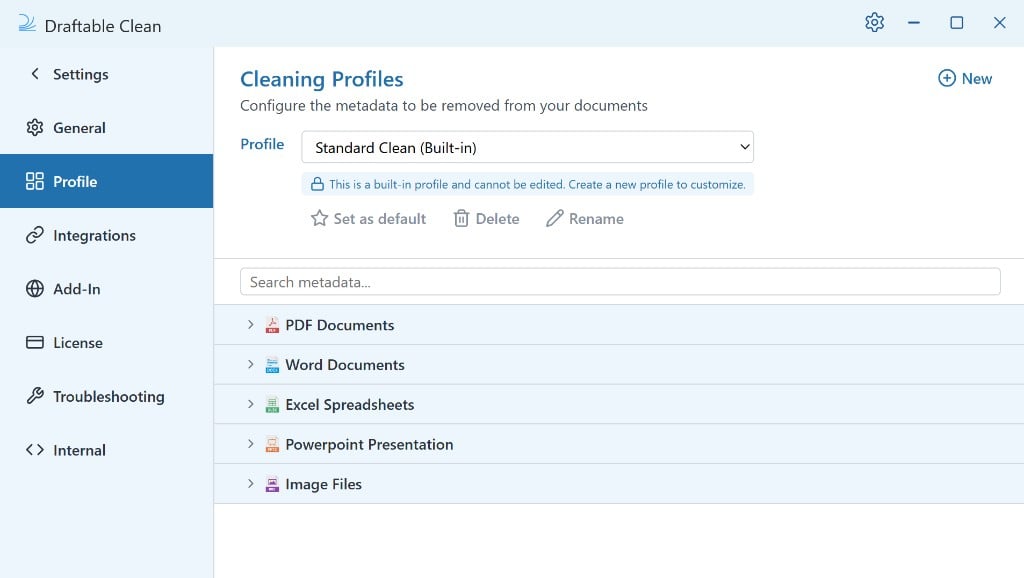
For some images, metadata cannot be preserved selectively. When this happens, Draftable Clean displays a warning that all metadata had to be removed.
Converting Office files to PDF
Draftable Clean can convert Word, Excel, and PowerPoint files to PDF as part of the clean — in both the desktop application and the Outlook add-in. In the desktop app, click the inline PDF icon on a file (it turns blue when flagged) or select files and click Convert in the toolbar. Flag supported files before or after cleaning to address metadata and deliver a consistent output format in one step.ZIP files
When you upload a ZIP file, Draftable Clean scans the metadata of the archive. Cleaned ZIP files are included alongside other cleaned files when saving or emailing. As of v26.9.0, you can also create a ZIP from files already in the application: select them and choose Bundle > Create ZIP bundle. This works with Word, PDF, Excel, PowerPoint, and image files, and the archive appears in the file list as a new entry. See Using the desktop application.Combining files into a single PDF
As of v26.9.0, several files can be combined into one PDF with Bundle > Create PDF bundle. Word, PowerPoint, and Excel files are converted to PDF as part of the process, so a mixed set of documents produces a single continuous PDF. See Using the desktop application.Unsupported file types
If you try to add a file with an unsupported file type, Draftable Clean will notify you that the file cannot be processed.