

Draftable Clean scans and cleans a wide range of metadata types across supported file types. Each metadata item is categorised, assigned a risk level, and can be configured to Preserve, Remove, Replace (with a custom value), or Flatten (convert to static content) — depending on the type. This page lists every metadata type supported in the current release.

Supported actions

ActionDescription
PreserveKeep the metadata as-is — no changes made
RemoveDelete the metadata from the document
ReplaceReplace the metadata value with a specified string (e.g. replace author with your firm name)
FlattenConvert interactive elements (form fields, structured document tags) to static content

Personal Information

Metadata that directly identifies individuals or organizations involved in the document.
Metadata typeDescriptionRiskActionsFile types
AuthorThe name of the document authorHighPreserve, Remove, ReplacePDF, Word
CompanyThe company name in document propertiesHighPreserve, Remove, ReplaceWord
CreatorThe creator of the document (may differ from author)HighPreserve, Remove, ReplacePDF
Last Saved ByThe user who last saved the documentHighPreserve, Remove, ReplaceWord
ManagerThe manager field from document propertiesHighPreserve, Remove, ReplacePDF, Word
ProducerThe application that produced the document (e.g. PDF producer)HighPreserve, Remove, ReplacePDF, Word
User AddressThe user address stored in the documentHighPreserve, Remove, ReplaceWord
User InitialsThe user initials stored in the documentHighPreserve, Remove, ReplaceWord
User NameThe user name stored in the documentHighPreserve, Remove, ReplaceWord

Document Properties

Core document metadata including titles, dates, counts, and structural information.
Metadata typeDescriptionRiskActionsFile types
CategoryThe category classification of the documentHighPreserve, Remove, ReplaceWord
Content StatusThe content status field (e.g. Draft, Final)HighPreserve, Remove, ReplaceWord
Created DateWhen the document was originally createdHighPreserve, RemovePDF, Word
DescriptionThe document description or summary fieldHighPreserve, Remove, ReplacePDF, Word
Document VersionThe version number of the documentHighPreserve, Remove, ReplacePDF, Word
IdentifierA unique identifier for the document (e.g. internal tracking number)HighPreserve, Remove, ReplacePDF, Word
KeywordsKeywords or tags associated with the documentHighPreserve, Remove, ReplacePDF, Word
LanguageThe language setting of the documentHighPreserve, RemovePDF, Word
Modified DateWhen the document was last modifiedHighPreserve, RemovePDF, Word
Printed DateWhen the document was last printedHighPreserve, RemoveWord
Revision NumberHow many times the document has been savedHighPreserve, RemoveWord
SecuritySecurity settings and permissions metadataHighPreserve, RemoveWord
Shared DocumentShared document collaboration metadataHighPreserve, RemoveWord
SubjectThe document subject fieldHighPreserve, Remove, ReplacePDF, Word
TitleThe document title — may contain project or client namesHighPreserve, Remove, ReplacePDF, Word
Total Editing TimeTotal time spent editing the documentHighPreserve, RemoveWord
AnnotationPDF annotations or markupLowPreserve, RemovePDF
CharactersCharacter count stored in document propertiesLowPreserve, RemoveWord
Characters (with spaces)Character count including spacesLowPreserve, RemoveWord
Document VariableDocument variables used by macros or fieldsLowPreserve, RemoveWord
Ink AnnotationInk/pen annotations (e.g. from tablet input)LowPreserve, RemoveWord
LinesLine count stored in document propertiesLowPreserve, RemoveWord
PagesPage count stored in document propertiesLowPreserve, RemoveWord
ParagraphsParagraph count stored in document propertiesLowPreserve, RemoveWord
Smart TagSmart tags providing contextual actions on recognized contentLowPreserve, RemoveWord
Structured Document TagContent controls in Word documentsLowPreserve, Remove, FlattenWord
ThumbnailThumbnail preview image stored in the documentLowPreserve, RemoveWord
WordsWord count stored in document propertiesLowPreserve, RemoveWord

Tracked Changes & Comments

Revision history and reviewer feedback — often the highest-risk metadata in legal documents.
Metadata typeDescriptionRiskActionsFile types
CommentsComments and annotations added by reviewersHighPreserve, RemoveWord
Tracked ChangesTracked changes (revisions) showing the full edit historyHighPreserve, RemoveWord
Tracked Changes AuthorThe author names attached to each tracked changeHighPreserve, Remove, ReplaceWord
Tracked Changes DateTimestamps on tracked changesHighPreserve, RemoveWord
Comments AuthorThe author name attached to each commentLowPreserve, Remove, ReplacePDF, Word
Comments DateTimestamps on commentsLowPreserve, RemovePDF, Word

Document Content

Document content that may contain hidden, embedded, or sensitive material.
Metadata typeDescriptionRiskActionsFile types
Attached FilesFiles embedded or attached to the documentMediumPreserve, RemovePDF
BookmarksBookmarks used for navigation — may reveal document structureMediumPreserve, RemovePDF, Word
Form FieldsInteractive form fields — flattening converts them to static textLowPreserve, Remove, FlattenPDF
Hidden TextHidden text not visible in normal viewLowPreserve, RemoveWord
Highlighted TextHighlighted text in the documentLowPreserve, RemoveWord
HyperlinksHyperlinks that may point to internal or sensitive URLsLowPreserve, RemovePDF
Obfuscated TextText obfuscated by color (e.g. white text on white background)LowPreserve, RemoveWord
OLE ObjectsEmbedded objects (e.g. Excel spreadsheets, Visio diagrams)LowPreserve, RemoveWord
Small TextVery small text that may be used to hide contentLowPreserve, RemoveWord
XML CommentsXML comments embedded in the document structureLowPreserve, RemoveWord

Other Metadata

Application-specific, custom, and miscellaneous metadata.
Metadata typeDescriptionRiskActionsFile types
Custom PropertyCustom document properties added by users or applicationsMediumPreserve, RemovePDF, Word
Custom UICustom UI elements (ribbon customisations) stored in the documentLowPreserve, RemoveWord
Custom XMLCustom XML data stored within the documentLowPreserve, RemoveWord
Digital SignatureCryptographic signatures — removing invalidates document authenticityLowPreserve, RemovePDF
UnclassifiedMetadata that does not fit into any other categoryLowPreserve, RemovePDF, Word
VBA CodeVBA macro code — can pose security risks if shared externallyLowPreserve, RemoveWord

Configurable per profile

All metadata types listed above can be individually configured within cleaning profiles. Each metadata type can be set to its supported action on a per-profile basis, giving you full control over what is removed, preserved, or replaced for each document type.
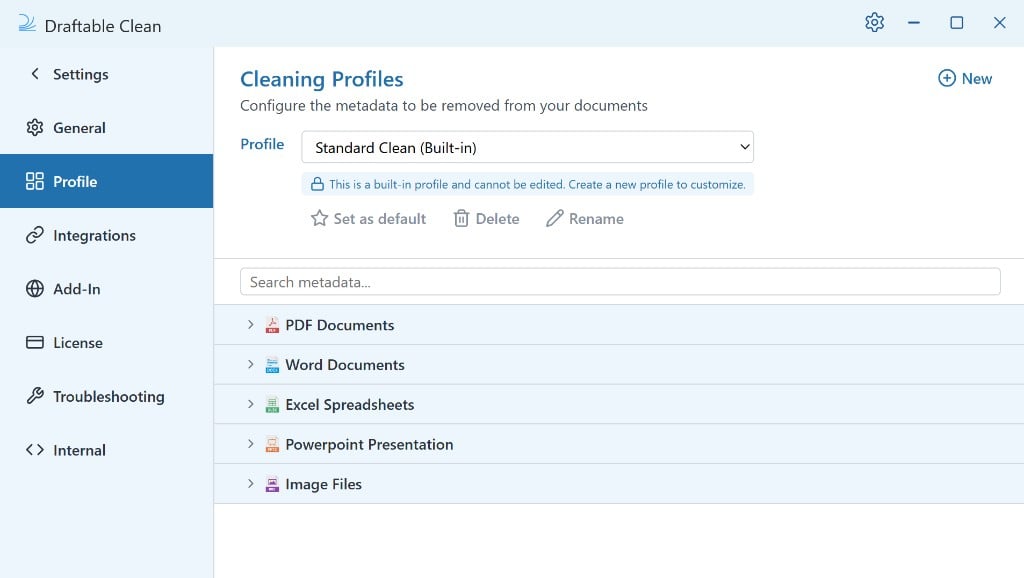
Where a metadata type supports Replace, you can specify a custom replacement value — for example, replacing individual author names with your firm name, or replacing document titles with a generic label.