

- **Clearer results when comparing scanned PDFs ** — PDF comparisons powered by Tungsten Automate now use improved OCR processing to better detect and align text in scanned documents.
- **Share Excel redlines more easily ** — Excel redlines can now be saved, printed or sent as PDFs. This new format improves compatibility and makes it easier to share redlines with clients or colleagues who don’t work in Excel.
- Save time reviewing version updates — The new “Compare with Latest” option in the Word Add-In pulls the open document from your DMS and automatically finds its most recent version. This allows for 1-click comparisons with minimal navigation.
- Preserve important context in markup — A new profile setting allows comment threads to be preserved when tracked changes are accepted before redlining. This ensures markup context is retained, even when documents must be cleaned prior to comparison.
- Exit bulk compare jobs with confidence — The confirmation message when exiting a completed Bulk Compare job now only appears if a save or export action was incomplete — removing unnecessary alerts and improving clarity in high-volume workflows.
Core Functionality
Improved accuracy for scanned PDF comparisons (OCR)
PDF comparisons using Tungsten Automate (Powered by OmniPage OCR) now deliver more reliable results on scanned documents, thanks to improved OCR performance that reduces alignment issues and false positives. This enhancement improves the quality of redlines generated from image-based files, such as scanned contracts and letters.Compare with Latest (Word Add-In)
A new option in the Word Add-In allows users to run a comparison between the current document and its previous version in the Document Management System — all in a single click. This speeds up version control reviews and eliminates manual file selection.
Output and Integration Enhancements
Export Excel Redlines as PDF
Excel redlines can now be exported as PDFs, making it easier to share, print, or store redline summaries for stakeholders who prefer non-editable formats.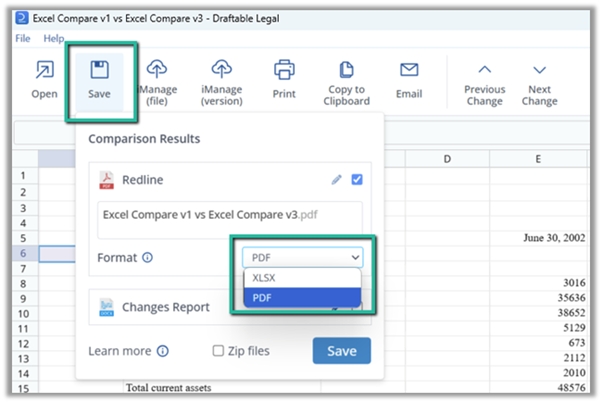
NetDocuments subversion support
Draftable now supports saving redline outputs as subversions in NetDocuments. The workflow also includes improved version recognition and easier selection of target subversions when saving.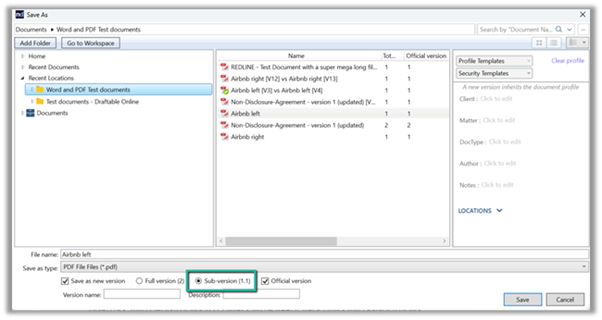
iManage: Option to disable ‘save as related file’
Administrators can now disable the “Save as Related File” option in iManage when configuring next actions. This gives firms more control over document storage preferences in integrated workflows.
Ease of Use Enhancements
Retain comments when accepting changes
A new Redline Profile setting ensures that comment threads are preserved when accepting tracked changes during preprocessing. This helps maintain reviewer context without compromising clean document formatting.Clearer messaging in Bulk Compare
The Bulk Compare exit message has been updated to appear only when a save or export action is incomplete. This removes unnecessary prompts and helps reviewers confidently complete large comparison jobs.Draftable window resizes correctly after Bulk Compare
When Bulk Compare mode is toggled off, the Draftable window now resizes properly — restoring the user interface to its previous state and improving usability.Bug Fixes
As with all releases, the April update includes fixes to several reported issues:- Fixed an issue where comparisons involving .RTF files failed to complete
- Fixed app startup failures when opening from a Draftable URL
- Corrected output file naming when comparing files with identical names
- Fixed intermittent app freezing when updating
- Resolved instances of duplication of cover pages in redline output