

- Organise your comparisons with browser-style tabs that you can reorder, move between windows, search, close and reopen.
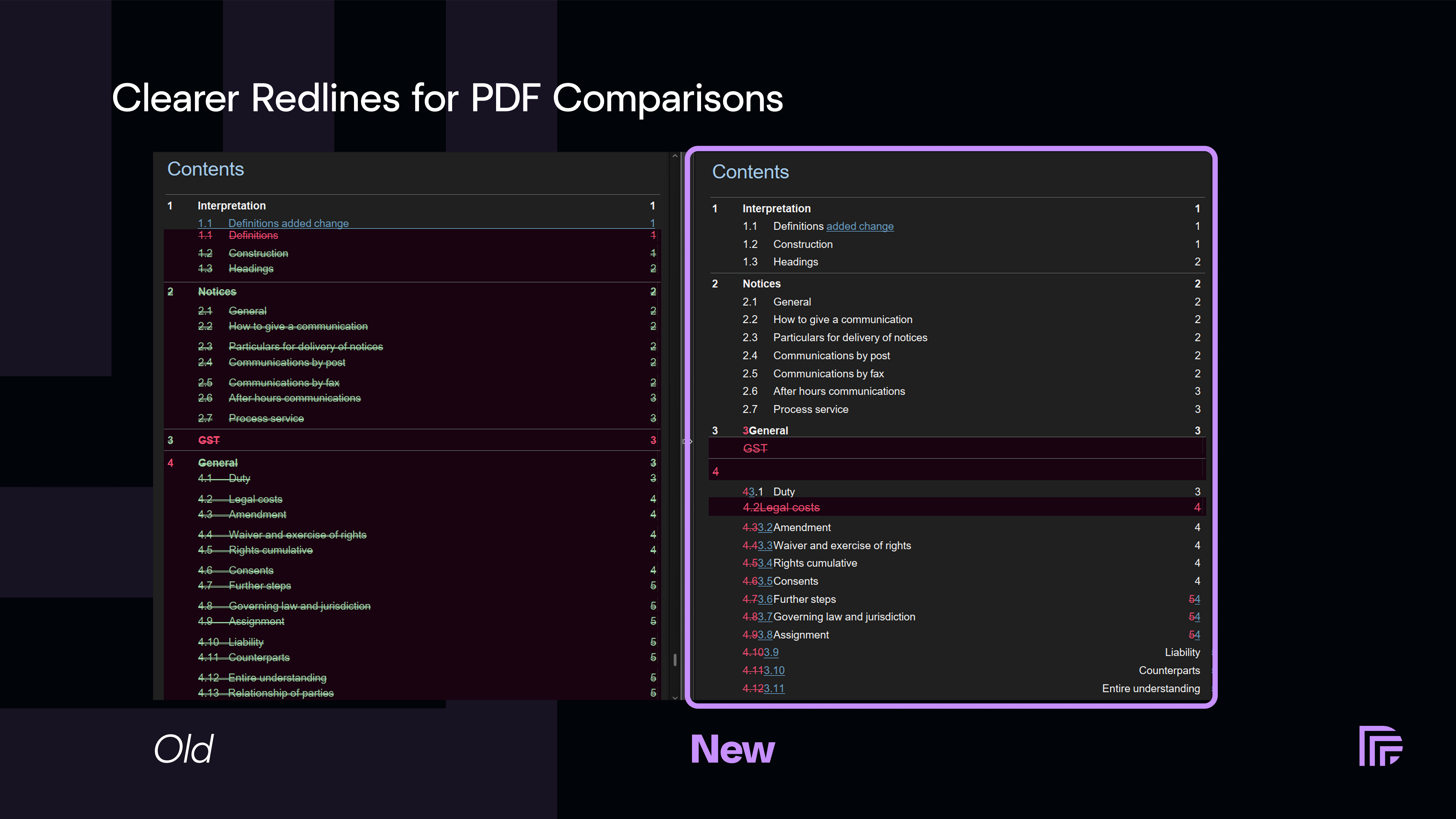
- Get cleaner Redline results from PDF files with a new engine that better handles differences in document structure and cuts down false deletion and insertion blocks.
- Spend less time arranging Bulk Compare with better automatic version ordering, matching against files already in the grid, and Sort and Undo controls.
- Start with the comparison type you use most by setting your own default or applying an organisation-wide starting point through Group Policy.
- Work with documents where they already are through the new Epona 365 integration and a more reliable list of open Word, Excel and PowerPoint files in Draftable in Office.
A more flexible comparison workspace
- Browser-style tabs: Reorder tabs, pull them into separate windows, or dock them back into another Draftable window. When the tab row fills up, it becomes scrollable. Press Ctrl+W to close the current tab.
- All tabs and recently closed comparisons: Press Ctrl+Shift+A to search the tabs in the current window, close them from the list, or reopen one of the last 10 comparison result tabs closed during this Draftable session. Press Ctrl+Shift+T to reopen the latest one.
- Export all open tabs: Collect the available outputs from the current window, then save, copy, or email them together, optionally as a zip file. Draftable lists any tab that cannot be exported and explains why. Tabs in separate, torn-off windows are not included.
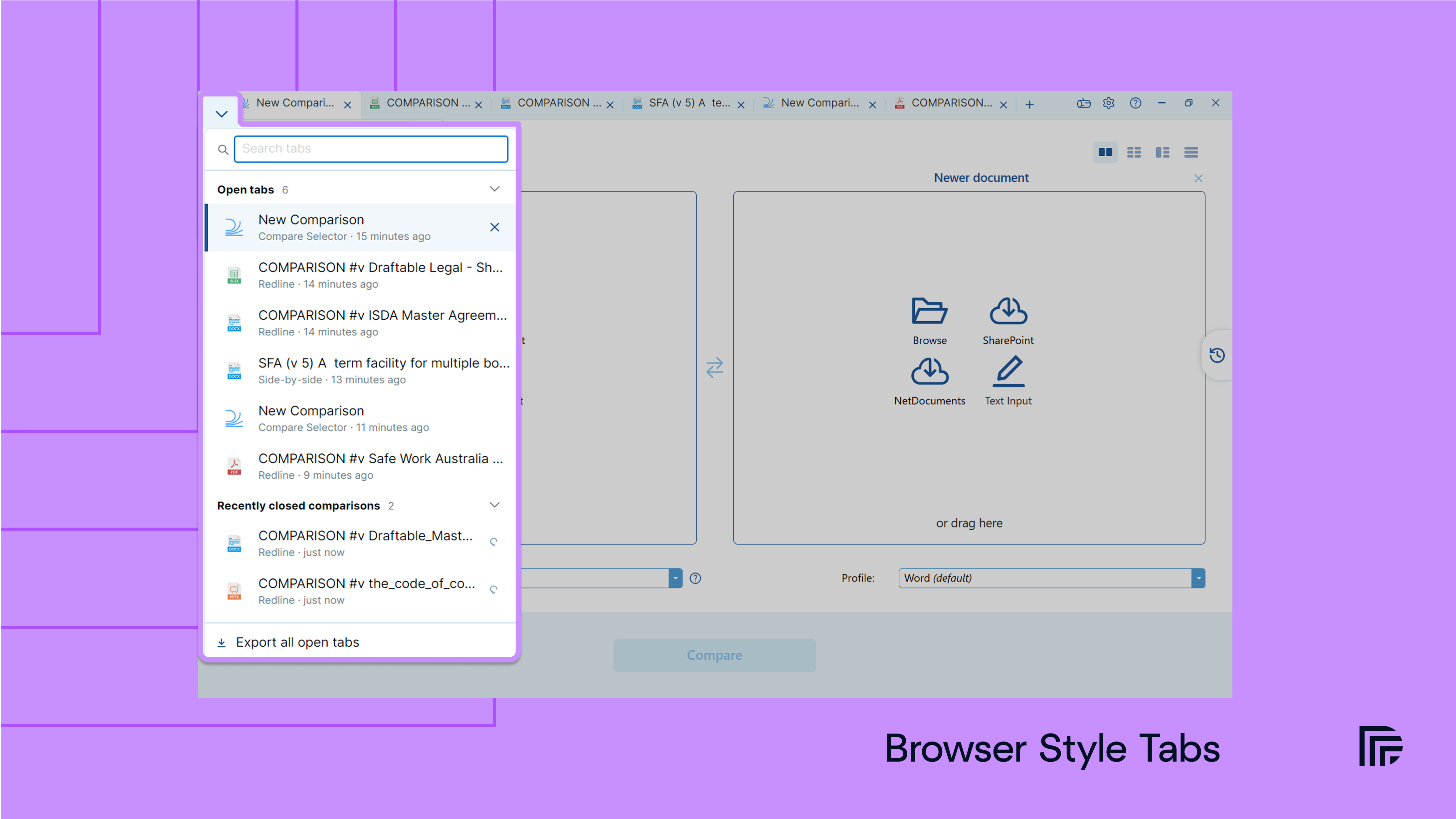
Recently closed comparisons are kept until Draftable exits. They are not restored after an exit, restart, or crash. New Comparison, Bulk Compare, Settings, and Logs tabs are not included.Reopening a comparison does not restore your review notes, status tags, or other review markup.
Less manual work in Bulk Compare
More reliable automatic pairing across mixed imports
Automatic version ordering now matches DMS files by document and version, supports a wider range of local filename patterns, and leaves uncertain files unmatched rather than forcing a pair. Draftable also matches new files against documents already in the grid. If you import an older set first and a newer set later, each incoming file can be placed opposite its matching document instead of in the next available space. Existing pairs and files you placed by hand stay where they are.Sort a full grid into version order
After several imports and manual changes, putting a Bulk Compare grid back in order could mean dragging every file into place yourself. Use Sort files into version order to rerun matching across the full grid. Draftable rearranges rows and columns where it finds a reliable match and keeps uncertain files unmatched. If you prefer the previous arrangement, select Undo sort. Sort and Undo are available when automatic version ordering is enabled.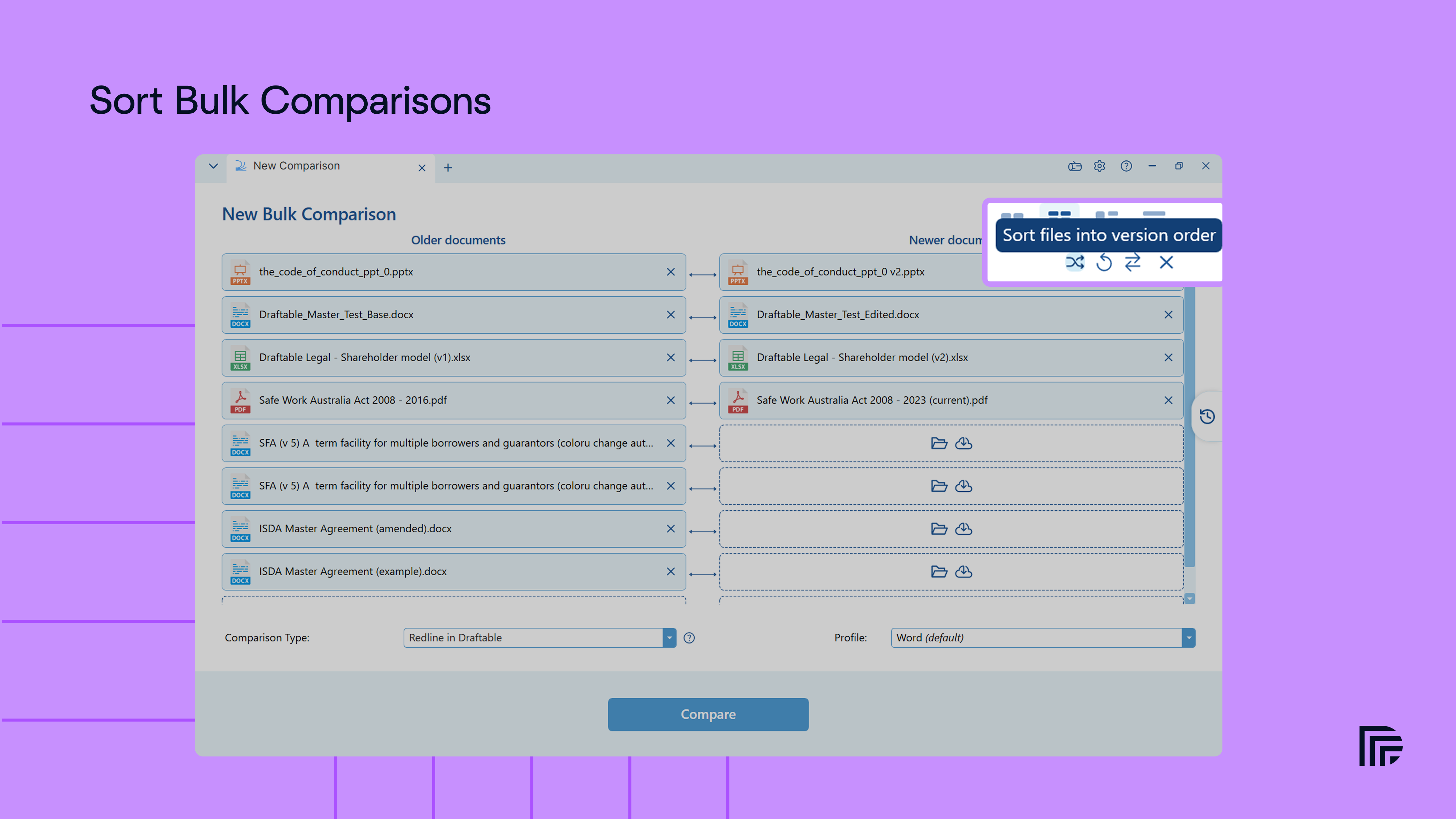
Cleaner Redline results for PDF-based workflows
- Cleaner Redlines for comparisons involving PDFs: A new engine better matches content when PDF conversion has changed the underlying document structure. This reduces false deletion and insertion blocks and improves tables, moved text, headers, footers, comments, text boxes and images. Word-to-Word Redline comparisons are unchanged.
- Faster and more focused outputs: Side by Side PDF exports, printed output and Redline change bars are faster to create and produce smaller files. Changes Reports now exclude unchanged content and use the same labels as the Change List.
Comparison types and profiles that follow your workflow
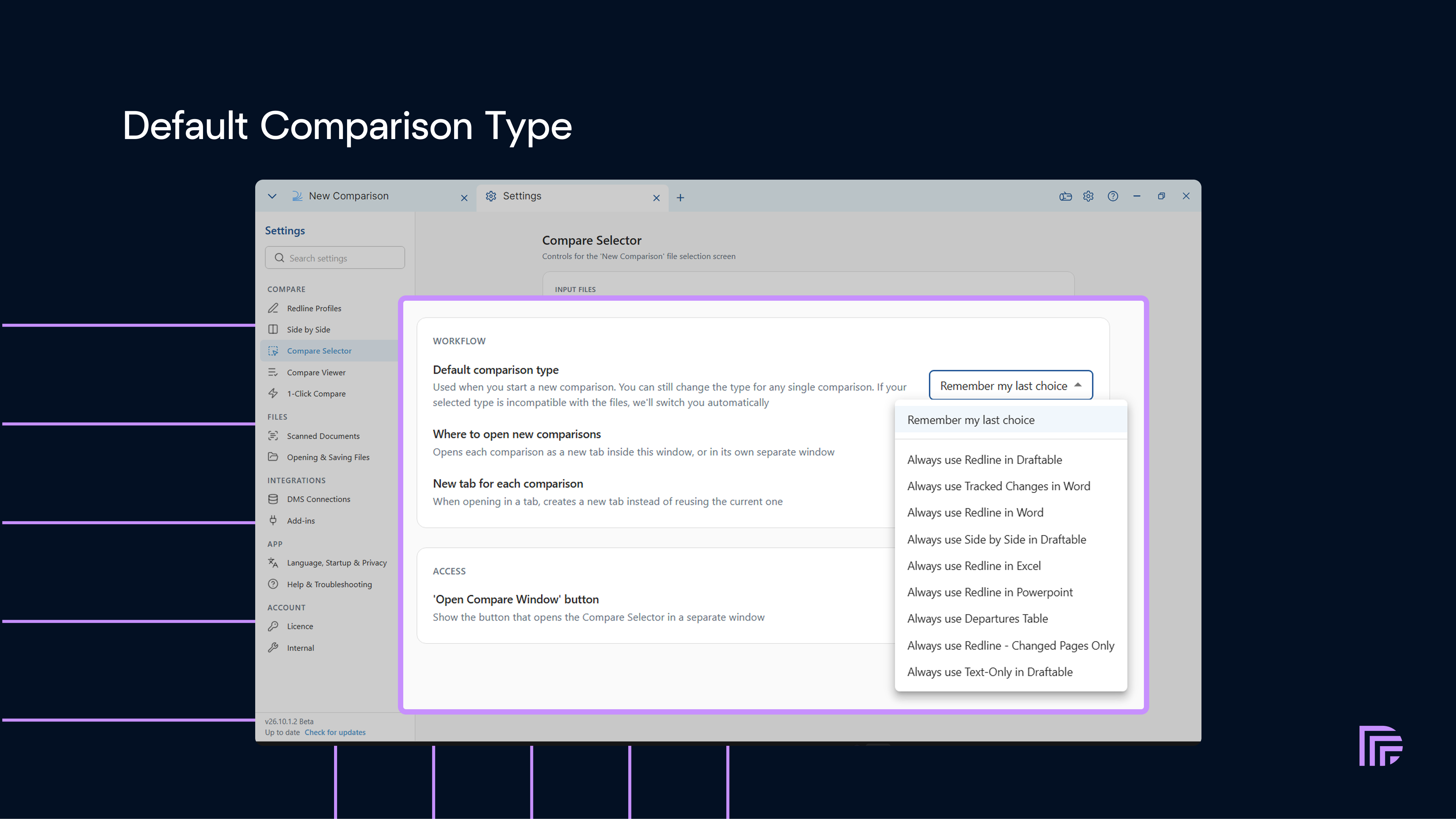
- Choose a default comparison type under Settings > Compare Selector > Workflow. Administrators can suggest a default for fresh profiles or enforce a starting type through Group Policy, while users can still choose another compatible type for an individual comparison.
- Keep the type you selected when adding or replacing files or changing a DMS version. If the files are incompatible, Draftable temporarily uses another type and switches back when your choice becomes available again.
- Start a Redline profile from an existing profile with the restored Based on option under Settings > Redline Profiles. Choose the active profile, another personal profile, or Draftable defaults.
- Compare Markdown files directly by selecting a
.mdfile for a Text Only comparison. Draftable compares the markup as plain text rather than rendering it.
Review outputs that are easier to use
Page numbers in Departures Table exports
The Departures Table showed what changed in a clause, but not where to find it in the document. On a long agreement, that meant searching the source for the surrounding language. The default single Departures Table export now includes a Page column in DOCX output. This is the page number shown in the Draftable viewer, not the page number from Word, a PDF viewer, or another tool.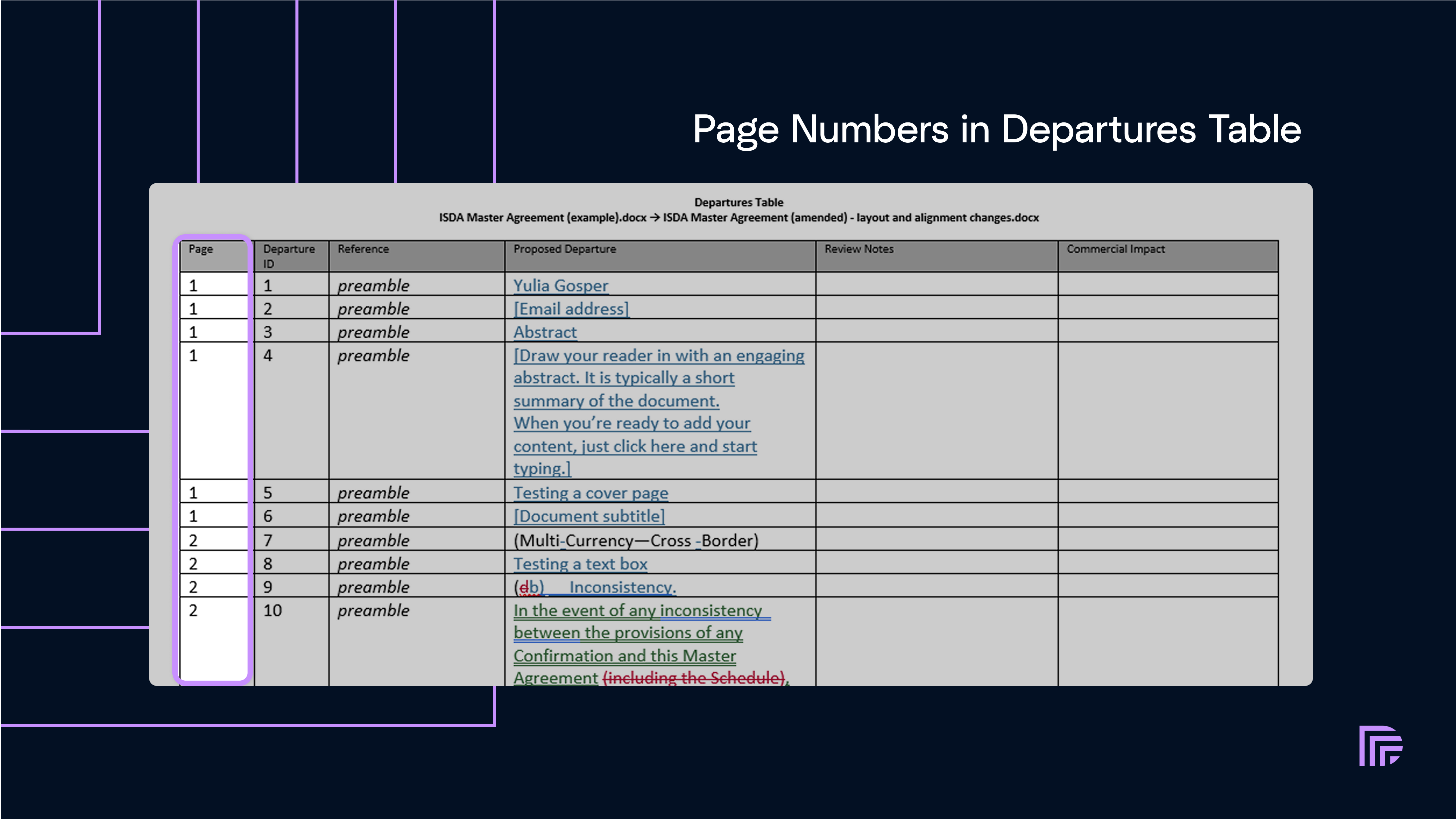
[p.12]. The Combined Departures Table Excel export does not include page numbers in this release.
Existing custom Word templates keep their current layout and do not gain a Page column automatically. To add one, administrators can use the new {Page} token. The other supported tokens are {DepartureId}, {Reference}, {Departure}, {ReviewNotes}, and {CommercialImpact}.
See How to configure a custom Departures Table template for template guidance.
Integration improvements
- Epona 365: Open one or more documents, select a version, run a comparison, and save the output back to Epona 365. The integration is off by default and requires a Draftable Legal licence, an Epona 365 tenant URL, and Microsoft 365 administrator consent through Epona. To save as a new version, select the existing document in Epona’s save window.
- Draftable in Office: With Draftable Legal 26.10.0 and add-ins version 2.69.0.0, Compare Open lists every document open in Word, Excel or PowerPoint. Office add-in uploads up to 50 MB are also supported.
This first Epona 365 release does not add Epona 365 to the Office add-ins, 1-Click Compare, Recent Files, or drag and drop. You cannot start a comparison from inside Epona 365. Draftable’s change-version, compare-with-previous, and newer-version notification features are also not available for Epona 365 documents yet.
Deployment and platform updates
TheDraftableDesktopLegal Group Policy template now includes policies for the default comparison type and Epona 365. We have also updated the bundled .NET cryptography components with current security fixes.
The iManage and SharePoint integration packages are unchanged in v26.10.0 and do not need to be redeployed for this release.
Bug fixes
October also includes fixes across Draftable Desktop and its integrations. Application fixes- Fix for Draftable windows appearing blurry, stretched, or incorrectly sized on high-DPI and mixed-scale monitors
- Fix for Changed Pages Only treating a page as unchanged when its only difference was moved text
- Fix for status tags not appearing in Departures Table review notes
- Fix for a timing-dependent file collision leaving Redline unavailable after a comparison completed
- Fix for comparisons failing on locked-down Windows profiles where Draftable could not access the required local cryptographic credentials
- Fix for the OCR choices under Settings > Scanned Documents remaining in English when another interface language was selected
- Fix for obsolete Draftable right-click menu entries remaining after a per-user installation was removed
- Fix for Microsoft Word rejecting Redline documents that contained changed shapes with picture, gradient, or pattern fills. Changed gradient and pattern fills use a flat redline tint.
- Fix for the Change List becoming unavailable when moved text contained a Word field
- Fix for valid Word equations with multi-part brackets stopping a comparison
- Fix for converted documents showing numbering markers that were not present in the source
- Fix for documents from some third-party redline tools failing when a drawing appeared inside a deleted paragraph
- Fix for hyperlinks being reported as changed when only Word’s stored form of the address differed, such as a trailing
/
- [iManage] Fix for Draftable freezing or closing when several files were added together; the files now download in the background
- [NetDocuments] Fix for versions being paired across different documents in Bulk Compare, and for version 1.10 sorting before 1.9
- [Office Add-in] Fix for Changed Pages Only returning the complete redline instead of excluding unchanged pages; the existing first-page setting now applies to this output