Export several comparisons together
Available from version 26.10.0 Use Export all open tabs to save, copy or email results from several comparisons in one operation. You can choose which comparisons and output files to include, and optionally package them in a zipped folder. This feature is available in Draftable Legal and Draftable Business, with outputs appropriate to your comparisons and licence. Before you start, open the comparison results you want to export in the same Draftable window.The export covers only the tabs in the window where you start it. Tabs in other windows, including windows created by dragging out a tab, are neither included nor listed under Not included. Move those tabs into the same window first, or export from each window separately. See Working with tabs and windows.
Choose and export your results
1
Open the export dialog
Click All tabs at the far left of the tab strip, then Export all open tabs at the bottom of the menu. Alternatively, right-click an empty area of the title bar and choose Export all open tabs.
2
Choose the comparisons and outputs
The Export all open tabs dialog groups your comparisons by comparison type. Clear the checkbox beside any comparison you want to leave out, then select the output files you want for each group.The output choices apply to the selected comparisons in that group. Available formats depend on the comparison type and the documents compared.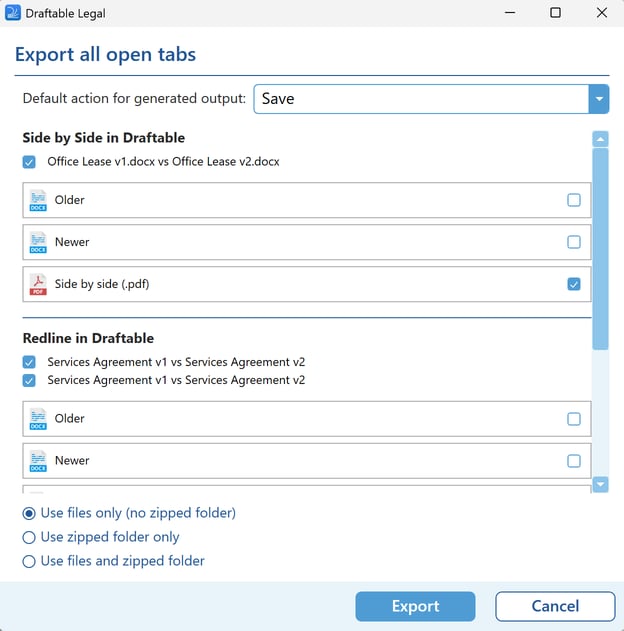
3
Choose how to share the files
In Default action for generated output:, choose:
- Save to save the files to your computer.
- Copy to Clipboard to copy the output files for pasting elsewhere.
- Email to prepare an email with the files attached.
4
Review exclusions and export
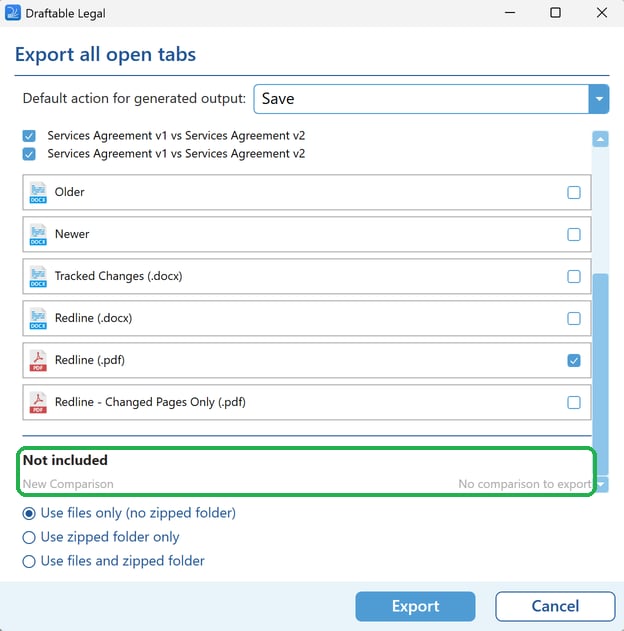
Check Not included for any tabs that cannot be exported, then click Export. Follow the save or email prompts for your selected action. Cancel closes the dialog without exporting.The Export button is enabled only when you have selected at least one comparison and at least one output for its group.
Understand the Not included list
The dialog lists tabs from the current window that cannot take part in the export, with one of these reasons:
A single departures-table comparison can be exported; a combined departures table is a separate view and is not included.